I.
• This device may not cause harmful int
• This device must accept any interf
II.
III.
NZXT Inc,
provisions set out in the Eur
IV
This class B digital apparatus meets all requirements o
Cet appareil numérique de la classe B respecte t
Canada.
V
Includes a KCC (Kor
KCC-R-R-ZXT
Declaration of Conformity
EN 55022
Limits and methods of measurement of radio disturbance char
EN 61000-3-2
Disturbance in supply systems ca
EN 61000-3-3
Disturbance in supply systems ca
EN 55024
Information technology equipment-immunity charact
EN 60950
Safety for information tec
M.2 SLO
M.2 SLO
ANTENNA
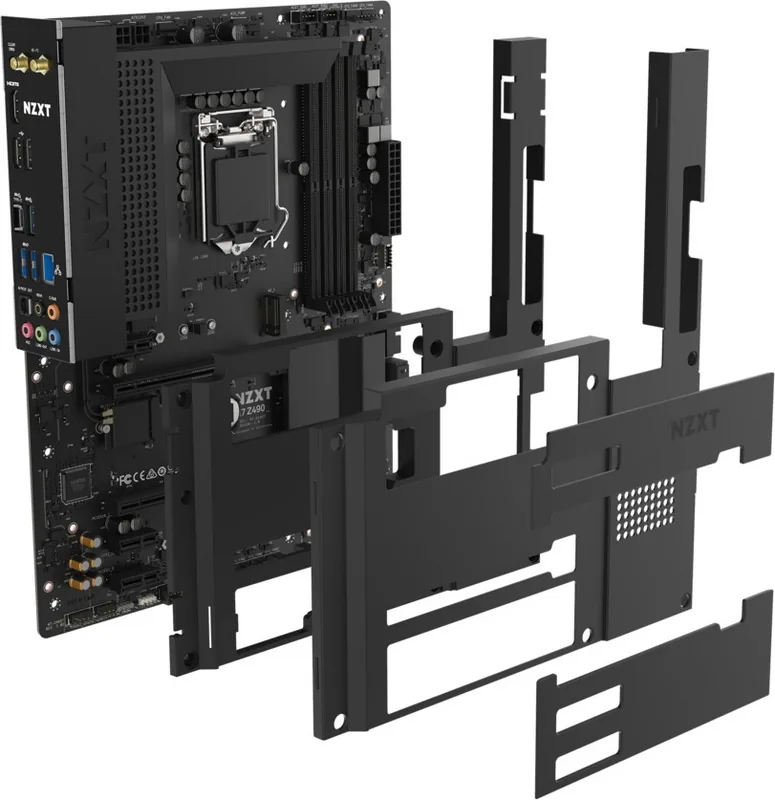
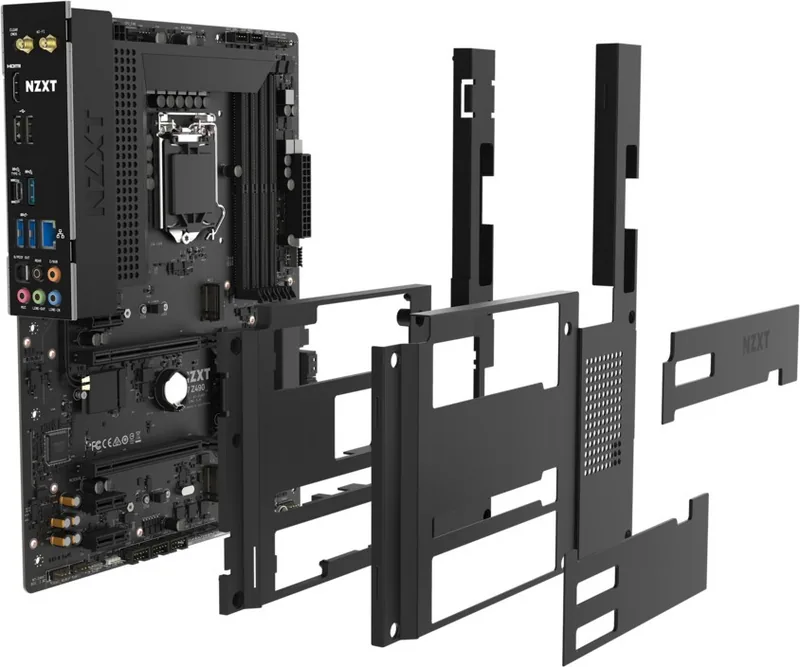
There are two M.2 slots on the N7 motherboar
steel cover pieces prior to installation.
to type 2280.
Hay dos ranuras M.2 en la placa base N7
cubierta de acero antes de la instalación.
diseños hasta el tipo 2280.
La carte mère N7 comporte deux slots M.2.
en acier avant l'installation.
forme jusqu'au type 2280.
Auf dem N7
müssen Sie die Abdeckungen aus Stahl entfernen.
unterstützen F
Материнская плата N7 оснащена двумя раз
необходимо снять стальные защитные крышки. Р
поддержку форм-факторов устройств до типа 2280.
N7 메인보드에는 두 개의 M.2 슬롯이 있습니다 . 설치 전 메탈 커버를 분리해야합니다.
M.2
슬롯은 타입 2280 폼팩터까지 지원합니다.
N7 マザーボー 2 つの M.2 ス
ース す 必 要 が
M.2 スロッ 2280 ま の ム
クタ サ ポ ートしま す
N7 主機板上有兩個 M.2 插槽。在安裝前您需要先拆下鋼質外蓋組件。 M.2 插槽支
援高達 type 2280 的外型規格。
A Key E M.2 slot supporting PCIe and CNVio is located a
motherboard.
®
Wireless-AX200 and two
antenna cables route the wir
En el centro de la placa base hay una ranur
CNVio.
®
Wireless-AX200 insertada.
cables de antena dirigen las señales inalámbricas a la interfaz de E/S tr
Un emplacement Key E M.2 prenant en char
centre de la carte mère.
®
Wireless-AX200 et de deux câbles d'ant
fil vers l'E/S arrière
Ein M.2 E-Key-Steckpla
der Mitte des Mainboards
®
Wireless-AX200 eingesetzt,
Signale an den rückwärtigen E/
В центре системной платы нахо
PCIe и CNVio. В данный слот уже установлен беспроводной адапт
®
Wireless-AX200, и в к
беспроводные сигналы на разъемы на задней панели.
PCIe 및 CNVio를 지원하는 Key E M.2 슬롯은 메인보드의 중앙에 있습니다 . 이 슬롯에
는
Intel
®
Wireless-AX200이 사전 설치되어 있으며 , 두 개의 안테나 케이블이 무선 신
호를
후면 I/O 로 전송합니다 .
PCIe および CNVio 対応の Key E M.2 ス
ています
Intel
®
ワイヤレス -AX200 が予め組み込2
本のア I/O に ル ー
位於主機板中央有一個 Key E M.2 插槽,可支援 PCIe 與 CNVio 。此插槽已預先安
裝 Intel
®
Wireless-AX200,並由兩條天線纜線將無線訊號路由至背面 I/O 。
A dual-band wireless ant
wireless and Bluetooth signals
Incluye una antena inalámbrica de doble banda para
amplificar las señales inalámbricas y de Bluetooth.
Une antenne sans fil à double bande est incluse pour
renforcer l
Eine integrierte Dualband-Wireless-Ant
Signale für kabellose V
У
антеннами для усиления беспроводных сигналов и сигналов по
каналу Bluetooth.
무선 및 블루투스 신호를 강화하기 위해 듀얼 밴드 무선 안테나가
포함되어 있습니다.
ワイヤレBluetooth電波の送信効果を高め
ルバ
提供的雙頻無線天線可增強無線和藍牙訊號。
FCC Compliance Statement
This equipment has been tested and found t
15 of the FCC Rules.
residential installation.
and used in accordance with the instructions,
there is no guarantee that int
interference to radio or t
encouraged to try to corr
• Reorient or relocate the r
• Increase the separation between the equipment and the r
• Connect the equipment onto an outlet on a circuit diff
• Consult the dealer or an experienced radio/TV technician f
Shielded interconnect cables and a shiel
compliance with the pertinent RF emission limits governing this device.
approved b
European Union
Batteries,
public collection system t
T
For better envir
California, US
The button cell battery may contain per
in California. Fhttp:/
CAUTION(!)
There is a risk of explosion,
by the manufacturer
T
Under the European (“EU”) Direc
EU,
as municipal wastes,
end of their useful life.
NZXT produc
Hinweis von NZXT zur Erhaltung und Sc
Gemäß der Richtlinie 2012/19/EU über El
mehr als kommunale Abfälle entsorgt wer
beauftragt, die in die Eur
zurückzunehmen.
Altgerätesammelst
NZXT como empresa compr
Bajo la directiva 2012/19/EU de la Unión Eur
desde el 14 de febrero de 2014,
depositados en los contenedores habituales de su municipio
a hacerse cargo de dichos pr
de recogida de sus productos v
productos en el punto limpio es
la recogida de estos residuos
En tant qu’écol
Au sujet de la directive eur
EU,
ou tout simplement mis à la poubelle.
fin de vie.
européenne.
REGULA
BA
WEEE (WAS
ELEC
ROHS COMPLIANCE
FRONT P
FAN CONNEC
NZXT RGB CONNEC 5V ADDRESSABLE RGB CONNEC
12V RGB CONNECT
BUTTONS AND POST LEDS
This connector connects to the fr
the case.
Este conector se conecta al audio del panel fr
de la caja.
Ce connecteur assure la connexion av
du panneau avant situé sur le boîtier
Dieser Anschluss wird mit dem Audioanschluss an
der Vor
Этот разъем использует
аудиоразъем
이 커넥터는 케이스의 전면 패널 오디오에 연결됩니다 .
このコ
トに 接 続し
此接頭連接機殼上的前面板音訊。
The CPU_FAN connect
automatically detec
The fan speeds can be adjusted within CAM.
El conector CPU_F
conectores S
o un ventilador de 3 patillas están conectados y soportan hasta 2A (24W) respectivamente
ventilador pueden ser ajustadas mediante CAM.
Le connecteur CPU_F
PUMP et les cinq S
à 4 broches ou un ventilateur à 3 br
ventilateurs peut être ajus
Der Anschluss CPU_FAN unt
Anschlüsse SY
Lüfter genutzt wird und unter
Разъем CPU_Fпозво подключать 4-контактные вентилят с ШИМ, рассчитанные на силу то до 1А (12 Вт)
Разъем AIO_PUMPи пять разъемов SYS_Fавтоматически определяют тип используемог вентилятора: 4 контактный с
ШИМ ( широтно- импульсная модуляция) или 3- кон— и поддерживают подач до 2А (24 Вт ) на каждый вентилятор.
Скорость вращения вентилятора можно настроить с помощью CAM.
CPU_FAN 커넥터는 최대 1A(12W) 의 4핀 PWM 팬을 지원합니다 . AIO_PUMP및 다섯 개의 SY커넥터는 4핀 PWM(Pulse
Width Modulation)
또는 3 핀 팬의 사용 여부를 자동으로 감지하며, 각각의 커넥터는 최대 2A(24W) 까지 지원합니다. 팬의 속도는
CAM
내에서 조정할 수 있습니다.
CPU_FAN
コネ1A (12W) まで4 ピンPWM ファン サ ポ ートしAIO_PUMPおよび 5つの SYS_Fコ クタ は 、4
ピンPWM(パル3 ピ2A(24W)
す
CAM内で
CPU_FAN 接頭支援高達 1A (12W) 的 4 針腳 PWM 風扇。 AIO_PUMP和五個 SY接頭會自動偵測是否正在使用 4 針腳
PWM (脈衝寬度調製) 或 3 針腳風扇,而且每個風扇最多支援 2A (24W)。可以在 CAM 中調整風扇速度。
There are two NZXT
accessories.
Dos cabezales RGB NZXT están ubicados en la placa base
accesorios de iluminación de NZXT
Deux connecteurs RGB de NZXT
accessoires d'éclairage NZXT
Auf dem Motherboard befinden sich zw
kompatibel.
На материнской плат
поддерживают подключение компонентов подсвет
6дополнительных принадлежностей.
마더보드에는 두 개의 NZXT RGB 헤더가 있습니다.포트는 NZXT 조명 액세서리와 호환됩니다 . 각각의 채널은 최대 40
개의 LED 와 6 개의 액세서리를 지원합니다.
NZXT RGBヘ2 つ すNZXT RGBポ ート NZXT照明
チ
40個まで LEDと6個まで の
主機板有兩個 NZXT RGB 接頭。NZXT連接埠與 NZXT 照明配件相容。每個通道最多支援 40 個 LED 和 6 個配件。
A 5V Addressable RGB is loca
WS2812B addressable RGB LED strip (5V
rating of 3A (5V) and supports up to 40 LEDs.
Un RGB programable de 5V
admite la tira LED RGB progr
potencia máxima de 3A (5V) y admite hasta 40 LED
Un RGB adressable de 5V est situé sur la carte mère
la bande LED RGB adressable WS2812B (5V/Data/GND
maximale de 3A (5V) et supporte jusqu'à 40 LED.
Auf dem Motherboard befindet sic
Dieser Port unterstützt ansteuerbar
Daten/GND),
40 LEDs.
На материнской плат
RGB. Этот порт поддерживает подключение адресной свет
WS2812B (5В/ данные/ заземление) с максимальной силой тока до 3А (5В) и
подключить до 40светодиод
5V Addressable RGB 커넥터는 메인보드에 있습니다 . 이 포트는 WS2812B
addressable RGB LED
스트립(5V/Data/GND) 을 지원하며, 최대 정격 전류 3A(5V),
40
개의 LED 모듈을 지원합니다.
5VアRGB はマザーボ
力
3A(5V)、40 個LED 以内で、WS2812Bアドレ ス 可 能 RGB LEDストリ
(
5V/Data/GND)を サ ポ ー ト し ま す 。
一個 5V 可定址 RGB 位於主機板上。此連接埠支援
WS2812B 可定址 RGB LED
條 (5V/資料/GND) ,最大額定功率為 3A (5V),最多支援 40 個 LED 。
A 12V RGB is located on the motherboar
RGB LED strip (12V/G/R/B)
within 2 meters.
Un RGB de 12V esta ubicado en la placa base.
tira LED RGB 5050 estándar (12V/G/R/B)
una longitud de hasta 2 metros
Un RGB de 12V est situé sur la carte mère
standard 5050 RGB (12V
une longueur de jusqu’
Auf dem Motherboard befindet sic
unterstützt Standard-5050-RGB-LED-Str
Nennleistung von 3A (12V) und einer Länge von bis zu 2 Metern.
На материнской плат
порт поддерживает подключение стандартной свето
зел./ красн./ син.) с максимальной силой тока до 3А (12В) и длиной до 2метров.
12V RGB 커넥터는 메인보드에 있습니다 . 이 포트는 표준 5050 RGB LED 스트립
(12V/G/R/B)을 지원하며 , 최대 정격 전력은 3A(12V),최대 길이는 2m입니다 .
12V RGBはマザーボー3A(12V)、長 さ 2 メー
トル以内で、
5050 RGB LEDストリ12V/G/R/B )を サ ポ ー ト し ま す 。
一個 12V RGB 接頭位於主機板上。此連接埠支援標準的 5050 RGB LED 條
(12V/G/R/B),最大額定功率為 3A (12V) ,長度在 2 公尺以內。
Power and Reset Butt
The power and reset button allow y
without connecting to a switch which is use
El botón de encendido y restablecimiento permit
base sin conectarse a un interrupt
Les boutons d'alimentation et de réinitialisation v
réinitialiser la carte mère sans avoir à la brancher à un interrupteur
lors de tests.
Mit der Netz-und Reset-T
ohne es mit einem Schalter verbinden zu müssen. Das erleichtert Systemtests.
Кнопка питания и перезагрузки системы позволяет включать и выключать
материнскую плату без подключения к переключателю, который у
при выполнении тестирования.
전원 및 리셋 버튼을 사용하면 스위치에 연결할 필요 없이 마더보드에 전원을 연결하거나
리셋할 수 있으며, 이는 테스트할 때 유용한 기능입니다.
電源お
た
電源和重開機按鈕可讓您打開主機板電源或重開機主機板而無需接上開關,這在測試
時相當有用。
Clear CMOS Button
The Clear CMOS button located on the rear I/
the power and remove the AC po
and hold the Clear CMOS button for 3 seconds
El botón de vaciado de CMOS situado en la interfaz de E/S traser
BIOS predeterminada.
para asegurarte de que no queda alimentación de reserva.
segundos.
Le bouton Clear CMOS situé sur l'E/S à l'arrière peut ê
par défaut. P
être sûr qu'il n'y ait pas de syst
secondes.
Mit dem Clear CMOS-Schalter am rückwärtigen E/
Löschen des CMOS schalten Sie das Netzt
sicherzustellen,
lang gedrückt.
Кнопку Clear CMOS, расположенную на задней панели ввода/вывода, можно использоваться для возврата к настройкам BIOS
по умолчанию. Чтобы выполнить о
Подождите 30 секунд, чтобы убедиться в от
кнопку Clear CMOS в течение 3 секунд.
CMOS 초기화 버튼은 후면 I/O 에 있으며 , BIOS 설정을 기본값으로 복구할 수 있습니다.를 초기화하려면 , 전원을 끈 뒤 전
원
공급 장치에서 AC 전원을 분리하십시오 . 대기 전력이 공급되지 않도록 30초간 기다리십시오 .초기화 버튼을 3초간 길
게
누르십시오 .
背面 I/O の CMOS クリア にBIOS 設定CMOS をAC電
源の電源ケ
30 秒CMOS ク 3 秒間
長 押
位於背面 I/O 上的清除 CMOS 按鈕可用來將 BIOS 設定回復成預設值。若要清除 CMOS ,請關閉電源接著移除連到電源供應
器的 AC 電源。靜待 30 秒以確保沒有待機電力存在。按住清除 CMOS 按鈕 3 秒。
Post LEDs
Post LEDs diagnoses the computer when users pow
up to indicate whether the CPU,
lights go off if the four mentioned above ar
Las LED de auto-prueba de arranque r
cuando los usuarios encienden su sistema.
la CPU,
Las luces se apagan si los cuatro dispositivos antes mencionadas f
normalmente.
L
l'allument. Il s'allume pour indiquer si le pr
stockage ont des disf
composants mentionnés ci-dessus fonctionnent normalement.
Die Post-LEDs zeigen die Diagnose des Computer
das System hochfährt.
CPU,
ordnungsgemäß funktionieren,
Светодиоды P
Эти индикаторы загорают
или устройствами хранения данных. Индикаторы гаснут
работают исправно.
사용자가 시스템의 전원을 켜면 Post LED 가 컴퓨터를 진단합니다. C 메모리,또
는
저장 장치가 고장 나면 불이 들어옵니다 . 위에 언급한 네 가지 장치가 정상 작동하면 불
이
꺼집니다 .
シPOST LEDはコCPU、メ モ リ 、 VGA、
または
4つが正常に機能
い
使用者開啟系統時,Post LED 會診斷電腦。其會亮起,指示 CPU 、記憶體、VGA 或儲
存裝置是否故障。如果上述四個裝置均功能正常,LED 將熄滅。
USB CONNECT
POWER CONNECT
These connectors allow y
devices requiring internal USB ports.
Estos conectores t
frontal o a dispositivos que requieran puertos USB int
Ces connecteurs vous permettent d'assur
du panneau avant ou les dispositifs nécessitant des ports USB internes.
Diese Anschlüsse ermöglichen die V
Vorderseit
Эти разъемы предназначены для подключения к портам USB на передней
панели или для подключения устройс
порты USB.
이 커넥터를 사용하여 전면 패널 USB 포트 또는 내부 USB 포트가 필요한 장치
에
연결할 수 있습니다 .
このコ USB ポー USB ポ ート
を必要と
這些接頭可讓您連接前面板 USB 連接埠或需要內部 USB 連接埠的裝置。
These connectors connect to an A
Estos conectores se conectan a una f
Ces connecteurs assurent la connexion à une alimenta
Diese Anschlüssen werden mit einem A
Эти разъемы используются для подключения блока питания A
이 커넥터는 AT 전원 공급 장치에 연결됩니다 .
これらのコネクタは、AT 電源に接続します。
這些接頭連接到 AT 電源供應器。
FRONT P
These connectors connect to the swit
indicator LEDs on the case.
Estos conectores se conectan a l
indicadores LED de la caja.
Ces connecteurs assurent la connexion a
interrupteur
Dieser Anschluss wird mit Schaltern und LEDs am
Gehäuse verbunden.
Эти разъемы используются для подключения к
переключателям и светодиодным индикат
корпусе.
이 커넥터는 케이스의 스위치 및 LED 표시기에 연결됩
니다
.
こ LED
に
這些接頭連接機殼上的開關和 LED 指示燈。
NZXT
This NZXT Global Warr
Any replacement product will be cov
whichever is longer
I.
II.
The Warranty covers onl
III.
Please note that our warranty is no
malfunctions within the warranty period,
product,
warranty does not cover the f
• any product or serial number/
• any damage that is not a manufacturing de
• damage,
nature,
• improper installation,
• shipping or transport damage (claims must be made with the carrier);
• normal wear and tear
NZXT does not warr
suitability of this product for y
exchanges and returns
covers one way shipping fr
all PSUs covered under the Less
approved NZXT
IV
NZXT's sole obligation and liability under this warranty is limited to the r
with either a new or refurbished produc
shall not, in any e
resulting from interr
resulting from its use or possession.
V
There are no other warranties,
for a particular purpose.
VI.
If you have already re
(800) 228-9395,
by email at
[email protected] , or visit the NZXT
Support site at
nzxt.com/cus VII.
T
request via the NZXT Support site outlining the pr
requiring testing,
to submit a Return Merchandise A
Once approved,
back to NZXT with the RMA number clearl
appropriate measures ar
VIII.
This warranty gives you specific legal righ
the laws of California (with excep
Convention of Contracts for the Int
the courts of California is agreed,
in connection with this Global Warranty in the country which y
additional rights.
For original consumers who are cover
province of purc
warranty are in addition to all rights and r
the extent that liability under such consumer laws can be limit
repair or replacement,
on supply
In the United Kingdom:
• For NZXT
following:
Up to 30 days:
Up to six months: if y
Up to six years:
• If the person seeking to rel
to that person provided tha
consumer
• The implied warranties under the Consumer Rights Act 2015 sa
which such goods are usually supplied,
In the EU:
• If you are a consumer and hav
provisions that cannot be der
In North America:
Within the first 60 days after pur
enclosures,
warranty and you can no longer r
assistance and instructions.
In Europe:
Within the first year after pur
enclosures,
warranty and you can no longer r
assistance and instructions.
In Australasia:
Within the first two years aft
enclosures,
warranty and you can no longer r
assistance and instructions.
The cost of shipping will be borne at the first instance b
reimburse reasonable postage or tr
Outside North America, Europe
If your product needs to be r
you purchased the pr
IX.
In the event that a warranty service is sought,
invoice) in order to r
X.
Eligible products under this NZXT
and if the item is returned to the NZXT
beyond 30 days o
will be credited to the original method of payment.
> Visit nzxt
> Visite el sitio Web nzxt.com/warranty y support.nzxt.com para obtener información sobre la cobertura y el servicio de la garantía.
> Visitez nzxt.com/war et support.nzxt
> Informationen zu Geltungsbereich und Service der Garantie finden Sie unter support.nzxt.com und nzxt.com/warranty
> Подробную информацию об условиях гарантийного обслуживания см . на веб -са nzxtи support.nzxt.com.
> 제품
보증 범위와 서비스 정보를 확인하시려면 nzxt.com/warranty 또는 support.nzxt.com 을 방문해 주시기 바랍니다 .
> 保証範囲およsupporと nzxt.com/warranty にアク
> 請訪問 nzxt和 sup了解產品保固範圍和更多服務訊息。
SUPPORT
SUPPORT AND SER
If you have any questions or pr
support system.
Please include a detailed explanation of y
our design team,
[email protected] . Lastly w
e would like to thank you for y
our support by purchasing this product.
For more information about NZXT
SOPORTE Y SERVICIO
Si tiene preguntas o problemas con el pr
oducto NZXT que usted compr
ó,
no dure en ponerse en contacto con
[email protected] y suministrar una explicación detallada de su probl
repuesto en support.nzxt.com. P
diseño:
[email protected] . Gracias por compr
ar un producto NZXT
. Par
a más información acerca de NZXT
, visítenos en línea.
Página web de NZXT:
SUPPORT ET
Si vous avez des questions ou des probl
nzxt.com avec une description détaillée de votre pr
remplacement auprès support.nzxt.com. P
[email protected] . Mer
ci d'avoir acheté ce produit de NZXT
.
Pour plus d'informations sur NZXT
, visit
ez notre site Web.
Site Web
de NZXT :
KUNDENDIENST
Falls Fragen oder Pr
Problembeschreibung und Ihr
em Kaufbeleg an
[email protected] . Ersa
tzteile können Sie unter support.nzxt.com anfragen.
Kommentare und Anregungen senden Sie bitt
e per
[email protected] an unser Designteam.
Vielen Dank, dass Sie ein
NZXTnzxt.com
СЛУЖБА ПОДДЕРЖКИ И ОБСЛУЖИВАНИЯ
В с возникновения вопросов или неисправностей в приобретенных вами продук тах NZXT обращайтесь по адресу:
[email protected] с подробным описанием проблемы и подтверждением покупки . О наличии запчастей можно узнать , обратившись по адресу: support.nzxt.com. Заме и предложения отправляйте в адрес нашей группы разработчиков:
[email protected] . Благодарим вас за покупку продукта NZXTБолее подробная информация о компании NZXT представлена на наших веб- сайтах. Веб- сайт NZXT: nzxt.com
지원 및 서비스
구입한 NZXT 제품과 관련하여 질문 또는 문제가 있을 경우, 당사의 지원 시스템(support.nzxt )을 사용하여 문의하십시오.
문제를 자세히 기술하고 구매 증빙을 제출하십시오. 의견 또는 제안 사항이 잇을 경우 당사 설계 팀에 designer@nzxt 으로 이메
일을 보내십시오. 마지막으로 이 제품을 구입하여 당사를 응원해 주셔서 감사합니다. NZXT 에 대해 자세히 알려면 온라인으로 방문하십
시오.웹사이트 : nzxt.com
サポー
でメーNZXT製品を NZXTに関す
サイNZXTウェブ サ : nzxt.com
支援和服務
NZXT 產品。有關 NZXT 的更多信息,請訪問我們的網站。 NZXT網站: nzxt.com
NZXT15736 E
NZXT Europe GmbH/ Industriering Os
New NZXT Produc
Warranty Length f
Computer Cases
2 Year
T
2 Year
Fans
2 Year
Lighting
2 Year
Accessories
2 Year
Kraken M Coolers
3 Year
Headset/Headphone
2 Year
Headset/Headphone Storage
2 Year
Mixer
2 Year
Motherboards
3 Year
Power Supply
10 Year
Kraken X/Z Coolers
6 Year
Mini ITX Case with PSU,
3-year warranty on case
10-year warranty on PSU.
Refurbished NZXT Pr
Warranty Length f
All NZXT Certified Refurbished Pr
1 Year
限用物质及元素列表 / 限用物質及元素清單
产品名称:N7
有害物质
部件名称
铅(Pb) 镉(Cd) 汞(Hg) 六价铬 (Cr
+6
) 多溴联苯(PBB) 多溴联苯醚(PBDE)
钮扣电池
✕
○ ○ ○ ○ ○
电路板
✕
○ ○ ○ ○ ○
电子组件
✕
○ ○ ○ ○ ○
线材 ○ ○ ○ ○ ○ ○
配件
○ ○ ○ ○ ○ ○
本表格依据SJ/T 11364 的规定编制。
◯
: 表示该有害物质在该部件所有均质材料中的含量均在 GB/T 26572 规定的限量 要求以下。
✕
: 表示该有害物质至少在该部件的某一均质材料中的含量超出 GB/T 26572 规定的 限量要求 ,然该部件仍符合欧
盟命令 2011/65/EU 的规范。
產品名稱:N7
限用物質及其化學符號
單元 鉛 (Pb) 鎘 (Cd) 汞 (Hg) 六價鉻(Cr
+6
) 多溴聯苯(PBB) 多溴聯苯醚(PBDE)
電路板 ○ ○ ○ ○ ○ ○
電子元件
—
○ ○ ○ ○ ○
線材
—
○ ○ ○ ○ ○
配件
—
○ ○ ○ ○ ○
備考1. “超出0.”及”超出 0.01wt%”係指限用物質之百分比含量超出百分比含量基準值。
備考2 “○” 係指該項限用物質之百分比含量未超出百分比含量基準值。
備考3“
—
” 係指該項限用物質為排除項目。
POWER
USB3_RX_DN
USB3_RX_DP
GND
USB3_TX_C_DN
USB3_TX_C_DP
GND
USB2.0-
USB2.0+
GND
POWER
USB3_RX_DN
USB3_RX_DP
GND
USB3_TX_C_DN
USB3_TX_C_DP
GND
USB2.0-
USB2.0+
USB+5V
USB_P2-
USB_P2+
GND
NC
USB+5V
USB_P1+
GND
USB_P1-
USB 2.0
USB 3.2 Gen.1 USB 3.2 Gen.2 Type-C
D-
GND
CC2
D+
RX2-
RX2+
GND
TX2-
TX2+
VBUS
VBUS
TX1+
TX1-
GND
RX1+
RX1-
VBUS
CC1
UNASSIGNED
UNASSIGNED
GND
+5V
+5V
+5V
RESERVED
GND
GND
GND
PSON#
GND
-12V
+3.3V
+3.3V
+12V
+12V
+5V STANDBY
POWER OK
GND
+5V
GND
+5V
GND
+3.3V
+3.3V
24-pin ATX_POWER 8+4-pin ATX_12V
+12V DC
+12V DC
+12V DC
+12V DC
GND
GND
GND
GND
+12V DC
+12V DC
GND
GND
POWER
USB3_RX_DN
USB3_RX_DP
GND
USB3_TX_C_DN
USB3_TX_C_DP
GND
USB2.0-
USB2.0+
GND
POWER
USB3_RX_DN
USB3_RX_DP
GND
USB3_TX_C_DN
USB3_TX_C_DP
GND
USB2.0-
USB2.0+
USB+5V
USB_P2-
USB_P2+
GND
NC
USB+5V
USB_P1+
GND
USB_P1-
USB 2.0 USB 3.2 Gen.1 USB 3.2 Gen.2 Type-C
D-
GND
CC2
D+
RX2-
RX2+
GND
TX2-
TX2+
VBUS
VBUS
TX1+
TX1-
GND
RX1+
RX1-
VBUS
CC1
UNASSIGNED
UNASSIGNED
GND
+5V
+5V
+5V
RESERVED
GND
GND
GND
PSON#
GND
-12V
+3.3V
+3.3V
+12V
+12V
+5V STANDBY
POWER OK
GND
+5V
GND
+5V
GND
+3.3V
+3.3V
24-pin ATX_POWER
8+4-pin ATX_12V
+12V DC
+12V DC
+12V DC
+12V DC
GND
GND
GND
GND
+12V DC
+12V DC
GND
GND
FRONT L
SENSE_SEND
FRONT R
MIC R
MIC L
SENSE2_RETURN
SENSE1_RETURN
PRESENCE#
GND
+HDD_LED
-RESET
+RESET
UNASSIGNED
-HDD_LED
+POWER_LED
+POWER_SW
-POWER_SW
-POWER_LED
PWM
+12V
GND
SPEED SIGNAL
5V
GND
DETECT
DATA IN
12V
R
B
G
5V
GND
DO_ADDR
R-R-ZXT
1. 4.
2. 3.
DOWNL
DESCARGA DE CAM DE NZXT
TÉLÉCHARGEMENT DE NZXT
HERUNTERLADEN VON NZXT
ЗАГРУЗКА ПРОГР NZXT CAM
NZXT CAM 다운로드
NZXT CAMのダウ
下載 NZXT CAM
Download and install NZXT Cwww.nzxt.com/
Descargue e instale NZXTwww.nzxt.com/
Twww.nzxt.com/
laden Sie NZXT CAM von www herunter und installieren Sie die Software
Загрузите и установите приложение NZXT CAM со с www.nzxt.com/camapp .
www.nzxt.com/ 에서 NZXT CAM을 다운로드하여 설치하십시오
NZXT CAMは www.nzxt.com/camapp か
請從 www.nzxt.com/camapp 下載並安裝 NZXT CAM