
PerfectPro Netbox Mode-D-Emploi
Manuel PDF · 70 Pages
Français



Vérification rapide
Réponse incorrecte, veuillez réessayer.
Discutez avec votre manuel PerfectPro Netbox grâce à l'IA
Obtenez des réponses instantanées par IA à partir de votre manuel PerfectPro Netbox
Posez toutes vos questions concernant le PerfectPro Netbox. Les réponses proviennent de ce manuel, avec les pages dont elles sont tirées.
Netbox Programme d'entretien
Remplacez ou rechargez les piles lorsque la puissance est réduite, que le son se dégrade, qu'il y a des saccades ou qu'un indicateur de batterie rouge apparaît.
Si la radio est exposée à la pluie, séchez complètement la fiche et le cordon avant de les reconnecter au secteur pour éviter tout choc électrique.
Poser une Question
Recommandez-vous Netbox?
Oui NonFoire aux Questions
Sélectionnez le mode Bluetooth sur la radio, appuyez sur et maintenez le bouton de réglage jusqu'à ce que l'indicateur clignote bleu. Ensuite sélectionnez la radio sur votre appareil. Le mot de passe est 0000 si demandé.
Cette réponse est-elle utile?
Cela signifie que la radio est protégée contre les projections d'eau et la pénétration de poussière. Elle convient à une utilisation en extérieur lors du fonctionnement sur batterie pendant la pluie.
Cette réponse est-elle utile?
Oui, le port USB fournit une sortie 5V / 1A pour charger les appareils USB ou lire des fichiers audio connectés au port.
Cette réponse est-elle utile?
La radio peut stocker jusqu'à 40 préréglages de mémoire pour les stations radio DAB, FM et Internet pour un accès rapide.
Cette réponse est-elle utile?
Oui, vous pouvez vous connecter via Bluetooth ou utiliser la technologie Spotify Connect via des appareils compatibles pour diffuser de la musique.
Cette réponse est-elle utile?
Accédez au menu Paramètres système, sélectionnez Heure/Date, et choisissez Définir Heure/Date. Utilisez le bouton de réglage pour ajuster chaque élément.
Cette réponse est-elle utile?
La radio est livrée avec une garantie limitée de 2 ans couvrant les défauts mais pas les dégâts dus à une mauvaise utilisation ou à des modifications non autorisées.
Cette réponse est-elle utile?
Avantages et Inconvénients
Avantages

- Protection IP64 contre l'eau et la poussière
- Grande gamme de modes audio incluant DAB et Internet
- Fonction d'appairage stéréo Bluetooth 5.2
- Capacité de charge USB pour les appareils externes
- Compatible avec l'application UNDOK pour le contrôle à distance
Inconvénients

- Requiert 6 piles de type C séparées pour une utilisation mobile
- Aucune batterie rechargeable intégrée incluse
- Configuration manuelle requise pour la connexion réseau
Produit Spécification
Source d'alimentation
6 piles C, Alimentation secteur (110-230 V)
Puissance de sortie
3-7 W
Récepteur
FM, DAB, DAB+, Radio internet
Connexions
Entrée AUX (3,5 mm), USB, Bluetooth, Wi-Fi 802.11b/g/n
Fonctionnalités
Poignée de transport, Horloge, Fonction alarme, 5 emplacements de mémoire, Port de charge USB
Sécurité
Résistance aux éclaboussures, Protection contre les chocs, Protection contre la poussière, IP65
Dimensions (LxHxP)
35,51 x 22,50 x 21,49 cm
Poids
4,50 kg
Contenu du colis
Adaptateur secteur
Description du Produit
Le compagnon ultime pour le chantier
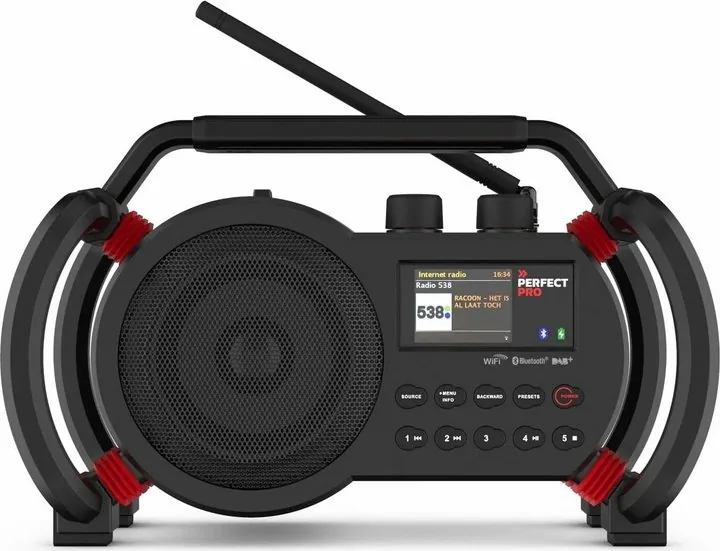
La radio de chantier PerfectPro Netbox se distingue comme un outil indispensable pour les professionnels en déplacement. Conçue pour résister aux rigueurs d'un environnement de construction, cette radio garantit un son clair quel que soit le bruit ambiant. Intégrant de nombreuses options de connectivité, elle offre une polyvalence que les radios traditionnelles ne possèdent pas. Sa qualité de construction robuste en fait un favori parmi les entrepreneurs qui ont besoin d'équipements fiables dans des conditions difficiles sans dépendre uniquement du secteur. Cette unité est conçue pour la durabilité et la performance dans des environnements exigeants.
Connectivité et Polyvalence
Les utilisateurs peuvent profiter des modes radio DAB, FM et Internet fluidement. Avec la connectivité Wi-Fi, accédez à des milliers de stations dans le monde sans avoir besoin d'une antenne relais à proximité. L'intégration de podcasts et Spotify signifie que le divertissement n'est jamais loin pendant les temps morts. Le Bluetooth 5.2 prend en charge l'appairage stéréo, permettant à deux unités de créer un vrai système de son stéréo sans fil. Un port USB offre la lecture audio et la charge du périphérique, ajoutant la commodité pour les utilisateurs exigeants qui doivent maintenir leurs téléphones en marche pendant le quart de travail. L'entrée auxiliaire garantit la compatibilité avec les anciens périphériques comme les lecteurs MP3 ou les tablettes. Vous pouvez même stocker des préréglages pour vos stations préférées pour un accès rapide.
Robustesse et Design
Conçu avec une note IP64, la Netbox résiste à la poussière et aux éclaboussures d'eau efficacement. Cela la rend idéale pour une utilisation en extérieur, même dans des conditions humides lorsque l'alimentation sur batterie est sélectionnée. La conception robuste comprend une poignée robuste et un boîtier solide qui protège les composants internes contre les chutes accidentelles. L'alimentation sur batterie prend en charge 6 piles de type C, assurant une longue durée de fonctionnement sans relier au secteur pendant le travail sur le site. Des piles NiMH rechargeables peuvent également être utilisées avec le paramètre de commutateur approprié pour une opération écologique.
Interface Utilisateur et Commandes
La navigation est simple avec un écran LCD clair et des commandes de bouton intuitives. L'application UNDOK permet la gestion à distance depuis des smartphones ou des tablettes pour plus de commodité. Les paramètres comme le contrôle du timbre et du volume permettent la personnalisation audio pour s'adapter aux préférences auditives personnelles ou aux environnements bruyants. Une fonction de réveil facilite le lever tôt sur le site, tandis qu'un minuterie de veille assure la conservation de l'énergie la nuit. Le menu des paramètres système permet la configuration réseau et la réinitialisation d'usine si nécessaire.
Sécurité et Configuration
Référez-vous au manuel de la radio de chantier PerfectPro Netbox pour des instructions de configuration détaillées incluant la configuration réseau. Cet appareil combine une ingénierie robuste avec des capacités de diffusion modernes. Que vous soyez sur le site ou à la maison, il délivre une performance fiable. Assurez-vous de lire les directives de sécurité concernant la manipulation des piles et les connexions électriques avant l'opération. Le produit supporte les mises à jour automatiques de l'heure via le réseau ou les signaux radio. Gardez toujours la ventilation dégagée pour empêcher la surchauffe pendant les périodes d'utilisation prolongée. La garantie couvre les défauts mais pas les mauvais usages ou les dégâts d'eau en utilisant l'alimentation secteur sous pluie. Le haut-parleur plein gamme de 5 pouces délivre 7 watts de puissance sous tension secteur. Il supporte les normes de puissance 50/60 Hz mondialement. Cela garantit la compatibilité internationale pour les voyages. Protégez le cordon d'alimentation de l'usure.
Rechercher 67 732 Manuels en ligne


Tapez la marque ou le modèle