
Reloop Flux Mode-D-Emploi
Manuel PDF · 28 Pages
Français



Vérification rapide
Réponse incorrecte, veuillez réessayer.
Discutez avec votre manuel Reloop Flux grâce à l'IA
Obtenez des réponses instantanées par IA à partir de votre manuel Reloop Flux
Posez toutes vos questions concernant le Reloop Flux. Les réponses proviennent de ce manuel, avec les pages dont elles sont tirées.
Flux Programme d'entretien
Vérifier le câble USB et le boîtier pour détecter tout dommage. Inspecter les pièces d'usure telles que les boutons et les interrupteurs pour vérifier leur usure.
Toujours déconnecter la prise USB en tenant le corps de la prise avant de nettoyer l'appareil afin de prévenir tout choc électrique.
Nettoyer l'appareil uniquement avec un chiffon humide. Ne jamais utiliser de solvants, de liquides de nettoyage à base de pétrole ou d'agents en spray sur les commandes.
Poser une Question
Recommandez-vous Flux?
Oui NonFoire aux Questions
Téléchargez depuis le site Serato. Le logiciel s'active avec le périphérique. Installez le pilote ASIO si demandé sur Windows. Pilote ASIO Manuel disponible sur le site web.
Cette réponse est-elle utile?
Oui avec le mode Thru, mais alimentation externe requise. Connectez l'alimentation USB-C pour utiliser les sorties sans PC.
Cette réponse est-elle utile?
2 A ou plus. Alimentation CC externe recommandée pour l'usage du hub actif. Alimentation bus USB minimum 400 mA.
Cette réponse est-elle utile?
Utilisez l'application Reloop Firmware Update App. Requiert Java Runtime Environment. Suivez les étapes à l'écran. La mise à jour prend 3 à 5 minutes.
Cette réponse est-elle utile?
Connectez les entrées RCA aux platines. Attachez le fil de terre à la borne. Réglez l'interrupteur Phono/Line UP pour les platines.
Cette réponse est-elle utile?
Oui via USB-C PD si une alimentation externe est branchée dans Flux. Assurez-vous qu'au moins 15 watts sont disponibles depuis l'alimentation.
Cette réponse est-elle utile?
160 par 120 par 34 mm. Le poids est de 0,85 kg. La conception compacte s'intègre facilement dans des racks standards.
Cette réponse est-elle utile?
Avantages et Inconvénients
Avantages

- Licence intégrée Serato DJ Pro et DVS incluse
- Prise en charge de trois decks pour configurations étendues
- Hubs USB actifs pour multiples accessoires
Inconvénients

- Nécessite une alimentation externe pour Thru sans ordinateur
- Aucune maintenance interne autorisée par l'utilisateur
- Doit attendre la température ambiante après un transport froid
Produit Spécification
Interface
USB-C 2.0
Canaux d'entrée
6
Canaux de sortie
6
Préamplis micro
Non
Entrées analogiques
3x Phono/Ligne stéréo en entrée (RCA)
Sorties analogiques
3x Ligne stéréo en sortie (RCA)
Entrées numériques
Non
Sorties numériques
Non
Convertisseur AD/DA
24 bits / 96 kHz
Fonctionnalités
Alimentation bus
Dimensions
16,00 x 3,40 x 11,99 cm (L x H x P)
Poids
0,85 kg
Description du Produit
Avis Reloop Flux
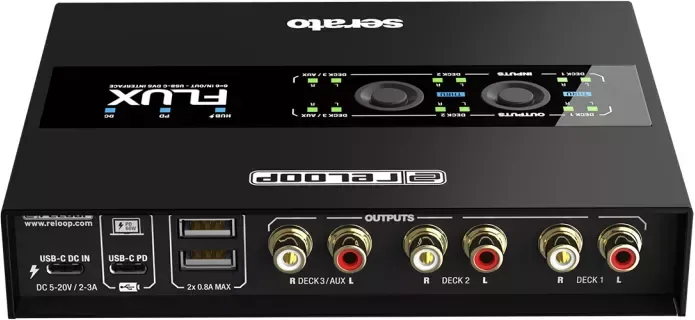
Le Reloop Flux se distingue comme une interface DVS USB-C professionnelle conçue pour les setups DJ modernes. Il permet aux DJs de numériser leur contrôle vinyle avec précision. Cette unité connecte les platines directement au logiciel Serato DJ. Chaque mouvement du disque de contrôle est reproduit virtuellement. Vous obtenez le contrôle numérique sans sacrifier la sensation des supports analogiques.
Fonctions de contrôle avancées
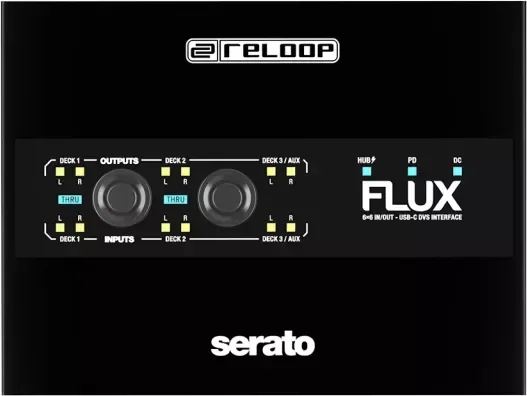
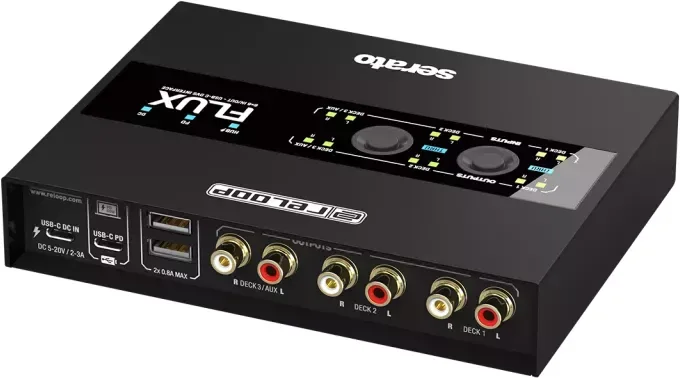
La gestion des signaux audio est simple grâce à trois entrées de decks. Chaque entrée prend en charge les sources Phono et Line. Vous basculez les commutateurs pour correspondre à l'équipement. L'interface comprend des diodes LED d'état des entrées et sorties. Elles indiquent les niveaux de signal et les risques de saturation en temps réel. Deux hubs USB actifs permettent de connecter facilement les contrôleurs MIDI. La distribution d'énergie est gérée via un port USB-C. Vous pouvez brancher une alimentation CC externe.
Intégration et logiciel
Les licences Serato DJ Pro et Serato DVS sont intégrées. Aucune clé supplémentaire n'est requise. Le logiciel s'active automatiquement. Les utilisateurs Windows ont besoin du pilote ASIO. L'intégration dans un rig de tournée est simple. Il mesure 160 par 120 millimètres. À 0,85 kg, il reste portable. Les instructions de sécurité sont vitales. Gardez-le au sec. N'ouvrez pas le boîtier. Le Manuel Reloop Flux fournit des directives. Évitez les liquides. Nettoyez avec un chiffon humide. Transporte-le dans son emballage. La ventilation est clé. Ne couvrez pas les aérations. S'il fait froid, réchauffez-le à l'intérieur. Les boutons Thru permettent d'écarter l'ordinateur. Utile pour les sets vinyle uniquement. La gestion de l'alimentation s'ajuste. L'alimentation bus USB fonctionne mais une source externe est recommandée. Vérifiez le site web pour les mises à jour firmware.
Qualité audio et sécurité
La qualité audio prend en charge la haute résolution. Elle gère les fichiers 24 bit à divers taux d'échantillonnage jusqu'à 96 kHz. Le rapport signal sur bruit dépasse 83 dB sur les entrées line. Cela garantit un son pur pour les lieux professionnels. Le contrôle de gain varie entre les modes Phono et Line. Vous gagnez jusqu'à 36 dB pour les platines. Les entrées Line en nécessitent beaucoup moins. La sortie maximale atteint plus de 11 dBV. Cela entraîne les mélangeurs efficacement.
La sécurité est primordiale lors de l'utilisation. Un risque de choc électrique existe avec une mauvaise manipulation de la tension. Suivez toutes les instructions de configuration soigneusement. Ne pas utiliser en chaleur extrême au-dessus de 35 C. L'humidité pose aussi des risques. La poussière peut dégrader les composants internes avec le temps. Si des fluides entrent, débranchez immédiatement. Contactez le service pour inspection. Toute modification non autorisée invalide les réclamations de garantie. L'entretien se limite aux parties externes. Un personnel qualifié doit effectuer les réparations internes. Gardez le guide sauvegardé pour référence future.
Les options de connectivité prennent en charge les flux de travail. Vous alimentez l'ordinateur via USB-C PD. Cela utilise un minimum de 15 watts. Le hub délivre la puissance maximale. Deux ports permettent 0,8 ampère chacun. Prend en charge les accessoires. Les lumières montrent le mode d'alimentation. Passif quand USB-A. Actif avec puissance suffisante. Aide au dépannage.
Rechercher 67 732 Manuels en ligne


Tapez la marque ou le modèle