Manual.ly Logo

SpeaKa Professional 10125216 Mode-D-Emploi

5,0 · 1 Notes

Manuel PDF · 8 Pages

Français

M: QW-35-FL
page

/ 8

Loading...
58f90aa509bf39274d8946856ea4d7317930 page 3
3
Important Information
Smart Motorized TV Ceiling Mount
Item no: 2531304 / SP-TVCM-510
Item no: 2531305 / SP-TVCM-520
1 Intended use
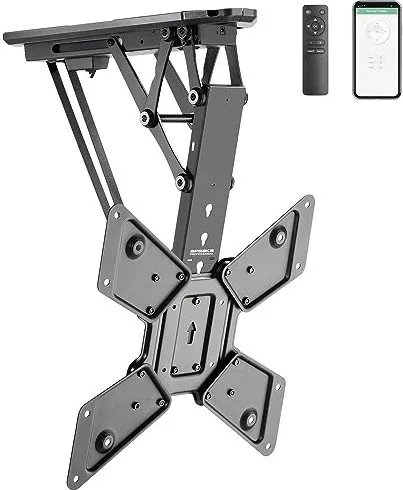
The product is a motorized TV/monitor ceiling mount. The product must be mounted to a ceiling before
use. The product is designed to hold one TV/monitor. The built-in motor moves the mount and TV/monitor
into a suitable position. The user can control the built-in motor in the following ways:
■
Remote control
■
Tuya mobile app
The product is intended for indoor use only. Do not use it outdoors.
Contact with moisture must be avoided under all circumstances.
If you use the product for purposes other than those described, the product may be damaged.
Improper use can result in short circuits, fires, electric shocks or other hazards.
The product complies with the statutory national and European requirements.
For safety and approval purposes, you must not rebuild and/or modify the product.
Read the safety instructions and any accompanying instructions carefully and store them in a safe place.
Make this product available to third parties only together with the safety instructions and any accompany-
ing instructions.
All company names and product names are trademarks of their respective owners. All rights reserved.
2 Latest product information
Download the latest product information at www.conrad.com/downloads or scan the QR code shown. Fol-
low the instructions on the website.
3 Description of symbols
The following symbols are on the product/appliance or are used in the text:
The symbol warns of hazards that can lead to personal injury.
The symbol warns of dangerous voltage that can lead to personal injury by electric shock.
4 Safety instructions
Read this document and the accompanying operating instructions carefully and espe-
cially observe the safety information. If you do not follow the safety instructions and
information on proper handling, we assume no liability for any resulting personal in-
jury or damage to property. Such cases will invalidate the warranty/guarantee.
4.1 General
■
The product is not a toy. Keep it out of the reach of children and pets.
■
Do not leave packaging material lying around carelessly. This may become dangerous playing mater-
ial for children.
■
If you have questions which remain unanswered by this information product, contact our technical
support service or other technical personnel.
■
Maintenance, modifications and repairs must only be completed by a technician or an authorised re-
pair centre.
4.2 Do not misuse
■
Do not sit, stand, hang onto, or support yourself on the product. The product can collapse or fall down
and cause injury.
■
Do not hang objects onto the product. The product can collapse or fall down and cause injury.
4.3 Handling
■
Handle the product carefully. Jolts, impacts or a fall even from a low height can damage the product.
4.4 Operating environment
■
Do not place the product under any mechanical stress.
■
Protect the appliance from extreme temperatures, strong jolts, flammable gases, steam and solvents.
■
Protect the product from high humidity and moisture.
■
Protect the product from direct sunlight.
■
Do not switch the product on after it has been taken from a cold to a warm environment. The con-
densation that forms might destroy the product. Allow the product to reach room temperature before
you use it.
4.5 Mounting surface
■
Unsuitable mounting surfaces can cause the mount to fall down and cause serious personal injury.
The mounting surface must be able to support the combined weight of the mount and the installed
monitor. If you are in doubt, ask a specialist before mounting.
4.6 Mounting materials
■
Unsuitable mounting materials can cause the mount to fall down and cause serious personal injury.
Select mounting materials (example: screws and dowels) that are suitable for the base wall material
(example: concrete).
4.7 Drilling
When penetrating the surface (example: drilling or inserting fasteners), make sure no cables
or pipes are damaged. Inadvertently penetrating electric cables causes the life-threatening
danger of an electric shock! Check for concealed wires and pipes before drilling or inserting
fasteners.
4.8 Monitor installation
■
Verify that the delivery content is complete before assembling the product. Do not assemble the
product if the delivery content is not complete.
■
Before beginning the installation process, check whether there are appropriate mounting options for a
mount on the back of your monitor.
■
A falling monitor or mount can cause serious personal damage. Keep people away from underneath
the installation location while installing the monitor.
■
Depending on the size and design of the monitor and mount concerned, it is sensible for a second
person to help with the installation. This person can hold the monitor still, for example, while you are
attaching the monitor to the mount.
■
Observe the maximum permissible monitor weight in the product documentation. Overloading can
cause the mount to collapse and lead to injury or property damage.
■
Proceed with care when assembling and installing the product! The product has some sharp edges.
There is a risk of injury!
■
Carry out only the work on the mount that is necessary to install it (or to change its location). Never
dismantle the mount and never attempt to convert it or to repair it in any way. Some mounts contain
highly pre-stressed metal springs. Dismantling such a mount in the wrong way could cause you
severe injury!
■
When fixing the monitor to the mount, make certain you use the correct screws. Not only must these
be of the correct thread type for the monitor, but they must also not be too long; otherwise, they will
damage the monitor. The screws must not be too short, however, since otherwise the connection will
not be secure.
■
The screws must be screwed into the threaded fixture holes on the monitor with at least 5 full 360°
turns. The correct screws are usually supplied together with the mount or with the monitor. Occasion-
ally, however (depending on the monitor type), other screws are required; these can be purchased
from specialist retailers.
■
Do not use any force when tightening the screws; otherwise, the monitor may be destroyed, leading
to loss of warranty/guarantee!
■
If you have any doubt about the correct length of the screws required, we recommend that you con-
tact the monitor manufacturer or an appropriate specialist.
■
Apply your full concentration when carrying out the installation, because if the monitor and/or mount
were to fall, this could cause expensive damage to the equipment and there is the potential danger of
personal injury!
■
Lay all the monitor’s cables in such a way that they do not get jammed or kinked in the mount.
■
Check all the screw fittings from time to time. Adjusting the position of the monitor and/or the mount
and moving them can sometimes cause the screws to become loose over time.
4.9 Power adapter
Do not modify or repair mains supply components including mains plugs, mains cables, and
power supplies. Do not use damaged components. Risk of death by electric shock!
■
Connect the appliance to a wall socket that can be accessed easily.
■
As power supply, only use the supplied mains adaptor.
■
Only connect the power adaptor to a normal mains socket connected to the public supply. Before
plugging in the power adaptor, check whether the voltage stated on the power adaptor complies with
the voltage of your electricity supplier.
■
Never connect or disconnect power adaptors if your hands are wet.
■
Never unplug the power adaptor from the mains socket by pulling on the cable; always use the grips
on the plug.
■
For safety reasons, disconnect the power adaptor from the mains socket during storms.
■
Do not touch the power adapter if there are any signs of damage, as this may cause a fatal electric
shock! Take the following steps:
– Switch off the mains voltage to the socket containing the power adapter (switch off the correspond-
ing circuit breaker or remove the safety fuse, and then switch off the corresponding RCD protective
switch).
– Unplug the power adapter from the mains socket.
– Use a new power adapter of the same design. Do not use the damaged adapter again.
■
Ensure that cables are not pinched, kinked or damaged by sharp edges.
■
Always lay cables so that nobody can trip over or become entangled in them. This poses a risk of in-
jury.
4.10 Batteries
■
Correct polarity must be observed while inserting batteries.
■
The batteries should be removed from the device if it is not used for a long period of time to avoid
damage through leaking. Leaking or damaged batteries might cause acid burns when in contact with
skin, therefore use suitable protective gloves to handle corrupted batteries.
■
Batteries must be kept out of reach of children. Do not leave batteries lying around, as there is risk,
that children or pets swallow them.
■
All batteries should be replaced at the same time. Mixing old and new batteries in the device can lead
to battery leakage and device damage.
■
Batteries must not be dismantled, short-circuited or thrown into fire. Never recharge non-rechargeable
batteries. There is a risk of explosion!
4.11 Operation
■
Consult an expert when in doubt about the operation, safety or connection of the product.
■
If it is no longer possible to operate the product safely, take it out of operation and protect it from any
accidental use. DO NOT attempt to repair the product yourself. Safe operation can no longer be guar-
anteed if the product:
– is visibly damaged,

Discutez avec votre manuel SpeaKa Professional 10125216 grâce à l'IA

Obtenez des réponses instantanées par IA à partir de votre manuel SpeaKa Professional 10125216

Posez toutes vos questions concernant le SpeaKa Professional 10125216. Les réponses proviennent de ce manuel, avec les pages dont elles sont tirées.

10125216 Programme d'entretien

Périodiquement
Vérifier tous les raccords à vis

Vérifiez que les vis ne se sont pas desserrées avec le temps en raison des ajustements du moniteur ou du mouvement du support. Serrez si nécessaire.

Si nécessaire
Nettoyer le boîtier du produit

Débranchez l'alimentation et essuyez avec un chiffon sec, sans fibres. N'utilisez pas de nettoyants agressifs et n'immergez pas dans l'eau.

M: qwen/qwen3.8-flash

Poser une Question

0/1000

Recommandez-vous 10125216?

Oui Non
0
User Pic

NisiQui94

il y a 5 mois

Le système de montage mural est-il stable, et l'application compagnon permet-elle un réglage facile de la hauteur de la TV ?

0
User Pic

Manual.ly

il y a 5 mois

Oui, les utilisateurs confirment que le support est très satisfaisant. L'application contrôle le mouvement du téléviseur de haut en bas sans faille via smartphone. De plus, le manuel inclus et le gabarit de perçage aident considérablement à l'accrochage du produit. L'installation est simple, et le fonctionnement est parfait selon les retours.

M: QW-35-FL
M: QW-35-FL

Foire aux Questions

A

Non, ce produit est conçu pour un usage intérieur uniquement. Le contact avec l'humidité doit être évité en toutes circonstances pour éviter les dommages et assurer la sécurité. Son utilisation en extérieur viole les termes de la garantie.

Cette réponse est-elle utile?

A

Selon la variante de modèle spécifique, il peut supporter jusqu'à trente ou trente-cinq kilogrammes. Vérifiez toujours que la surface du plafond peut supporter le poids combiné du support et de votre appareil.

Cette réponse est-elle utile?

A

Vous pouvez contrôler le moteur intégré en utilisant la télécommande incluse ou en vous connectant à l'Application Mobile Tuya. Cela fournit des options de positionnement flexibles pour votre installation de divertissement.

Cette réponse est-elle utile?

A

La télécommande nécessite deux piles de type AAA fournissant 1,5 volt chacune. Assurez-vous de remplacer les deux piles simultanément lorsque nécessaire pour maintenir une fonction appropriée.

Cette réponse est-elle utile?

A

Utilisez un chiffon sec, sans fibres, pour nettoyer le boîtier. Débranchez d'abord le produit de l'alimentation. Ne pas l'immerger dans l'eau ou utiliser des produits nettoyants agressifs.

Cette réponse est-elle utile?

M: QW-35-FL

Avantages et Inconvénients

Avantages

  • Ajustement motorisé via télécommande ou application mobile
  • Prend en charge de grands écrans jusqu'à soixante-dix pouces
  • Répond aux normes de sécurité et de conformité européennes
  • Connectivité sans fil avec une portée de vingt mètres
  • Installation intérieure économise l'espace au sol
VS

Inconvénients

  • Usage intérieur strictement uniquement
  • Ne peut pas être utilisé en extérieur avec de l'humidité
  • L'assemblage nécessite une vérification précise de la longueur des vis
  • Des ressorts pré-tendus présentent des risques d'installation
  • Remplacement des piles obligatoire chaque fois
M: QW-35-FL

Produit Spécification

Type

Montage plafond

Nombre d'écrans

1

Taille de l'écran

58,42 cm - 139,7 cm

Mouvements

inclinaison (0°, +75°), rotation (6°), hauteur réglable, motorisé

Charge max

30,00 kg

VESA

100x100, 200x200, 300x300, 400x200, 400x400

Couleur

Noir

Poids

7,44 kg

M: QW-35-FL

Description du Produit

Transformez Votre Espace de Vie avec le SpeaKa Professionnel 10125216

Améliorez votre installation de divertissement à domicile avec le SpeaKa Professionnel 10125216. Ce support téléviseur plafond motorisé innovant offre un design élégant et une fonctionnalité avancée. La référence au Manuel SpeaKa Professionnel 10125216 assure une installation correcte pour la sécurité et la longévité. Le moteur intégré ajuste le positionnement sans effort via une télécommande pratique ou l'Application Mobile Tuya. Il est conçu spécifiquement pour un usage intérieur uniquement. Le contact avec l'humidité doit être évité en toutes circonstances pour éviter les dommages.

Cet appareil maintient un téléviseur ou un moniteur en toute sécurité au-dessus du niveau des yeux. L'installation nécessite une surface de plafond capable de supporter le poids combiné du support et de l'appareil. Des variations de modèle spécifiques prennent en charge des limites de poids allant jusqu'à trente-cinq kilogrammes avec des tailles d'écran compatibles de vingt-trois à soixante-dix pouces. Vérifiez toujours soigneusement les longueurs de vis pour éviter les dommages internes. Des bords tranchants existent lors du montage, maniez donc avec un soin extrême pour éviter les blessures.

L'entretien implique le nettoyage régulier avec un chiffon sec, sans fibres. Ne pas utiliser d'eau ou de produits chimiques agressifs sur le boîtier. Assurez-vous que l'alimentation est déconnectée avant tout processus de nettoyage. L'adaptateur secteur nécessite une tension domestique standard conforme aux normes de distribution publique. Les piles dans la télécommande sont de type AAA et doivent être remplacées simultanément. La couverture Wi-Fi atteint jusqu'à vingt mètres de manière fiable. Bluetooth prend également en charge une portée de vingt mètres pour la connectivité.

La sécurité est primordiale tout au long du cycle de vie de la propriété. Ne pas faire un mauvais usage du support en se assis ou en accrochant des objets dessus. Ne pas tenter de démanteler le support vous-même car il contient des ressorts pré-tendus. Tenez les enfants à l'écart des matériaux d'emballage pour éviter les risques d'étouffement. Si visiblement endommagé, ne pas le réparer vous-même. Consultez un technicien pour garantir que la garantie reste valide et la sécurité maintenue. Les conditions environnementales doivent rester entre zéro et quarante degrés Celsius avec une humidité relative entre vingt et quatre-vingt-cinq pour cent.

Une élimination correcte est requise à la fin de la durée de vie du produit. Séparez les piles de l'appareil avant la mise au rebut. Suivez les réglementations locales sur les déchets électroniques strictement. Cet appareil répond aux exigences de sécurité européennes. Profitez d'un angle de vision flexible sans limitations structurelle permanente une fois installé correctement. Le SpeaKa Professionnel 10125216 apporte la commodité intelligente à la disposition de votre pièce et maximise l'efficacité de l'espace au sol. Vérifiez tous les raccords périodiquement car le mouvement peut les desserrer avec le temps.

Notes d'utilisation

Assurez-vous que l'alimentation est déconnectée avant le nettoyage. Vérifiez tous les raccords de vis périodiquement car le mouvement peut les desserrer avec le temps. L'inspection régulière assure que votre investissement dure.

M: QW-35-FL

© Copyright 2026 Manual.ly
