Manual.ly Logo

SpeaKa Professional SP-MM-940 Mode-D-Emploi

0,0 · 0 Notes

Manuel PDF · 8 Pages

Français

M: QW-35-FL
page

/ 8

Loading...
debdc7977ee6253abf6b500e83af45c8c336 page 3
3
Safety Instructions
Monitor Holder with Multiport Hub
Item no: 2731204 (SP-MM-800)
1 Intended use
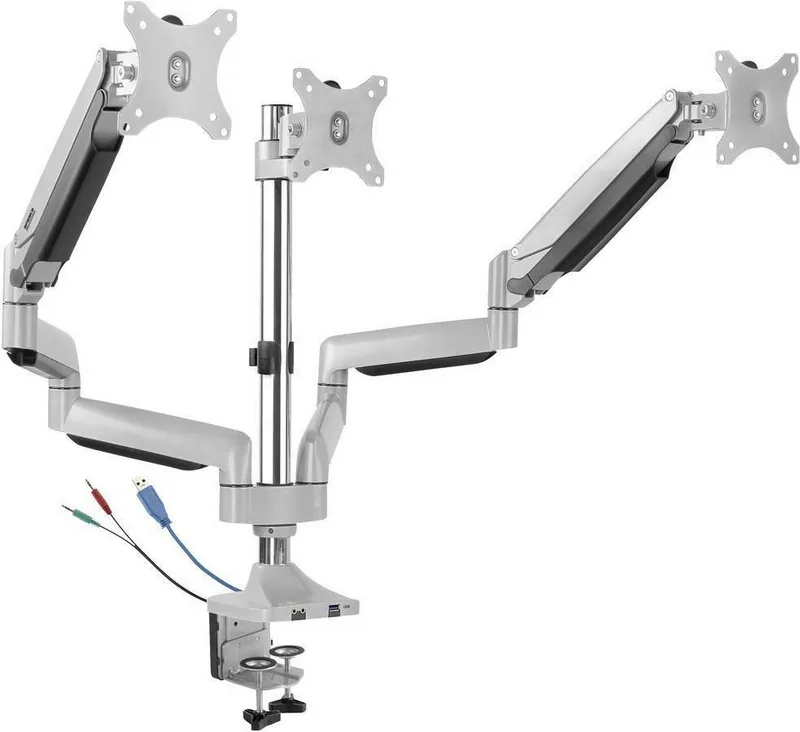
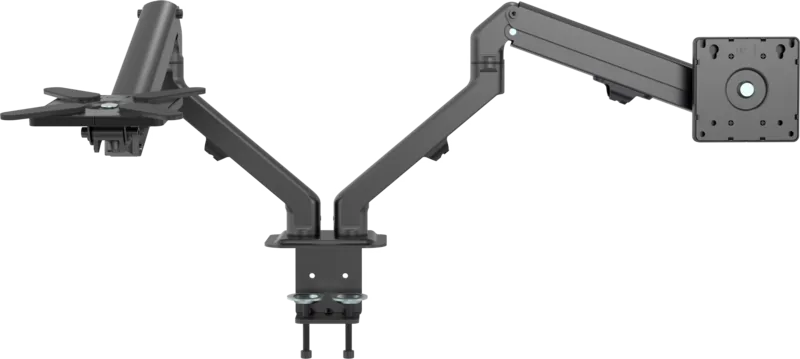
The product is a spring loaded three monitor arm with integrated hub. It secures to your table
using a clamp.
The product is intended for indoor use only. Do not use it outdoors.
Contact with moisture must be avoided under all circumstances.
If you use the product for purposes other than those described, the product may be dam-
aged.
Improper use can result in short circuits, fires, electric shocks or other hazards.
The product complies with the statutory national and European requirements.
For safety and approval purposes, you must not rebuild and/or modify the product.
Read the operating instructions carefully and store them in a safe place. Make this product
available to third parties only together with the operating instructions.
All company names and product names are trademarks of their respective owners. All rights
reserved.
2 Delivery contents
■
Product
■
Operating instructions
3 Latest product information
Download the latest product information at www.conrad.com/downloads or scan the QR
code shown. Follow the instructions on the website.
4 Description of symbols
The following symbols are on the product/appliance or are used in the text:
The symbol warns of hazards that can lead to personal injury.
The symbol warns of dangerous voltage that can lead to personal injury by elec-
tric shock.
5 Safety instructions
Read the operating instructions carefully and especially observe the safety
information. If you do not follow the safety instructions and information on
proper handling, we assume no liability for any resulting personal injury or
damage to property. Such cases will invalidate the warranty/guarantee.
5.1 General
■
The product is not a toy. Keep it out of the reach of children and pets.
■
Do not leave packaging material lying around carelessly. This may become dangerous
playing material for children.
■
If you have questions which remain unanswered by this information product, contact our
technical support service or other technical personnel.
■
Maintenance, modifications and repairs must only be completed by a technician or an
authorised repair centre.
5.2 Handling
■
Handle the product carefully. Jolts, impacts or a fall even from a low height can damage
the product.
5.3 Operating environment
■
Do not place the product under any mechanical stress.
■
Protect the appliance from extreme temperatures, strong jolts, flammable gases, steam
and solvents.
■
Protect the product from high humidity and moisture.
■
Protect the product from direct sunlight.
■
Do not switch the product on after it has been taken from a cold to a warm environment.
The condensation that forms might destroy the product. Allow the product to reach room
temperature before you use it.
5.4 Operation
■
Consult an expert when in doubt about the operation, safety or connection of the
product.
■
If it is no longer possible to operate the product safely, take it out of operation and pro-
tect it from any accidental use. DO NOT attempt to repair the product yourself. Safe op-
eration can no longer be guaranteed if the product:
– is visibly damaged,
– is no longer working properly,
– has been stored for extended periods in poor ambient conditions or
– has been subjected to any serious transport-related stresses.
5.5 Connected devices
■
Also observe the safety and operating instructions of any other devices which are con-
nected to the product.
5.6 Installation location
■
Select an installation location for the monitor holder and any supplied accessories that
facilitates safe and ergonomic use.
5.7 Before assembly and installation
■
Verify that the delivery content is complete before assembling the monitor holder and ac-
cessories. Do not assemble if any parts are missing.
■
Prevent damage to the monitor. Refer to the manufacturer instructions that came with
the monitor to find out how and where to attach a monitor holder or monitor mount.
■
Handle the monitor and screen with care. Always lay the monitor flat and use a pad or
cloth to protect the table surface and monitor from damage.
■
Risk of injury and/or damage when unpacking the spring loaded arm! Hold each spring
arm together while someone else cuts the zip tie. Slowly release the pressure on the
spring arms and open slowly to full length.
5.8 Table mounting
If you mount the monitor holder on a table:
■
Attach the monitor holder only to a sufficiently stable, horizontal table top. Tables made
of glass, ceramic or stone slabs or thin plastic-coated wooden-fibre slabs, are categoric-
ally unsuitable for attachments. Furthermore, you must not attach the monitor holder to
shelves or similar unstable or unsteady surfaces.
■
Attach the monitor holder only at a position on the table top that is suitable for this pur-
pose. Consider the significant lever action involved!
■
The weight of the monitor and monitor holder as well as its fixed position and significant
lever action can all cause pressure marks on the table top. For this reason, we do not re-
commend that you mount it on valuable furniture items!
■
For safety reasons, the monitor holder and the monitor that is attached to it should be
situated only above the table surface. The design of many monitor holders means that it
is not suitable for the monitor arm to be situated anywhere other than above the table
surface. There is also a danger of it toppling over in certain circumstances!
■
Ensure that the monitor holder is fixed to the table top securely. Otherwise it could slip
off the table top when you are moving the monitor and the monitor holder. As well as
causing material damage, this poses a danger of personal injury!
5.9 Removing a monitor
■
Risk of injury and/or damage from spring loaded arm! Before removing an attached mon-
itor, always set the front arm to the highest position so it cannot "spring up" after the
monitor is removed.
6 Maintenance
■
Adjusting the positions of the monitor and the monitor mount can cause the screws to
become loose over time. Check all the screw fittings from time to time.
7 Cleaning and care
Important:
– Do not use aggressive cleaning agents, rubbing alcohol or other chemical solutions.
They damage the housing and can cause the product to malfunction.
– Do not immerse the product in water.
1. Disconnect the product from the power supply.
2. Clean the product with a dry, fibre-free cloth.
8 Disposal
This symbol must appear on any electrical and electronic equipment placed on
the EU market. This symbol indicates that this device should not be disposed of
as unsorted municipal waste at the end of its service life.
Owners of WEEE (Waste from Electrical and Electronic Equipment) shall dispose
of it separately from unsorted municipal waste. Spent batteries and accumulators,
which are not enclosed by the WEEE, as well as lamps that can be removed from
the WEEE in a non-destructive manner, must be removed by end users from the
WEEE in a non-destructive manner before it is handed over to a collection point.
Distributors of electrical and electronic equipment are legally obliged to provide free take-
back of waste. Conrad provides the following return options free of charge (more details on
our website):
■
in our Conrad offices
■
at the Conrad collection points
■
at the collection points of public waste management authorities or the collection points
set up by manufacturers or distributors within the meaning of the ElektroG
End users are responsible for deleting personal data from the WEEE to be disposed of.
It should be noted that different obligations about the return or recycling of WEEE may apply
in countries outside of Germany.

Discutez avec votre manuel SpeaKa Professional SP-MM-940 grâce à l'IA

Obtenez des réponses instantanées par IA à partir de votre manuel SpeaKa Professional SP-MM-940

Posez toutes vos questions concernant le SpeaKa Professional SP-MM-940. Les réponses proviennent de ce manuel, avec les pages dont elles sont tirées.

SP-MM-940 Programme d'entretien

Périodiquement
Vérifier tous les raccords à vis

Le réglage de la position des moniteurs peut desserrer les vis avec le temps. Vérifiez régulièrement tous les raccords à vis.

Si nécessaire
Nettoyer le boîtier du produit

Débranchez l'alimentation et nettoyez avec un chiffon sec, sans fibres. N'utilisez pas de nettoyants agressifs et n'immergez pas dans l'eau.

M: qwen/qwen3.8-flash

Poser une Question

0/1000

Recommandez-vous SP-MM-940?

Oui Non

Foire aux Questions

A

Non, le produit est destiné à une utilisation intérieure uniquement. Le contact avec l'humidité n'est pas autorisé en toute circonstance. Son utilisation à l'extérieur peut entraîner des dommages ou des risques de sécurité comme des décharges électriques.

Cette réponse est-elle utile?

A

Ce système prend en charge jusqu'à trois écrans. Chaque écran peut peser entre 1 et 7 kilogrammes. Assurez-vous que le poids total sur l'étau ne dépasse pas les limites de la table.

Cette réponse est-elle utile?

A

Le support prend en charge les motifs VESA 75x75 et 100x100 millimètres. Les tailles d'écran vont de 13 à 32 pouces. Vérifiez toujours les spécifications de votre écran spécifique avant de l'attacher.

Cette réponse est-elle utile?

A

Débranchez d'abord le produit de l'alimentation. Utilisez un chiffon sec sans fibres. N'utilisez pas d'eau, d'alcool ou d'agents de nettoyage chimiques car ils peuvent endommager le boîtier.

Cette réponse est-elle utile?

A

Un risque de blessure existe avec les bras à ressort. Tenez les bras ensemble pendant la coupe des attacheurs. Relâchez la pression lentement. Assurez-vous que la table est stable et de niveau pour éviter le basculement.

Cette réponse est-elle utile?

A

Ne pas jeter dans les ordures ménagères non triées. Suivez les lois locales sur les déchets électroniques pour un tri séparé. Supprimez les données personnelles avant de les remettre aux collecteurs.

Cette réponse est-elle utile?

A

Oui, le Hub Multiport nécessite 5 volts en courant continu à 1 ampère. Il se connecte via une interface USB-A. Assurez-vous que vos sources connectées fournissent des niveaux de puissance adaptés.

Cette réponse est-elle utile?

M: QW-35-FL

Avantages et Inconvénients

Avantages

  • Intègre un Hub Multiport pour une connectivité simplifiée.
  • Prend en charge jusqu'à trois écrans simultanément.
  • Compatible VESA avec les normes 75x75 et 100x100.
  • Le bras à ressort assure un positionnement vertical fluide.
  • Conforme aux exigences de sécurité et réglementaires européennes.
VS

Inconvénients

  • Utilisation intérieure uniquement, l'humidité doit être évitée.
  • Les bras à ressort présentent un risque de blessure lors du déballage.
  • Nécessite un plateau de table stable, non adapté au verre.
  • La limite de poids par écran est de 7 kilogrammes maximum.
  • Nettoyage limité au chiffon sec, aucun produit chimique.
M: QW-35-FL

Produit Spécification

Type

Bureau

Nombre d'écrans

3

Taille de l'écran

33,02-81,28 cm

Réglabilité

Inclinaison (-95°, +90°), Rotation (180°, Pivotement (180°), Hauteur réglable

Charge maximale

7,00 kg

VESA

75x75, 100x100

Caractéristiques clés

Ressort à gaz, Gestion des câbles, Hub USB

Couleur

Argent

Dimensions (LxHxP)

153,01 x 70,00 x 19,00 cm

Poids

9,51 kg

M: QW-35-FL

Description du Produit

Aperçu du Support SpeaKa Professional SP-MM-940

Améliorez l'efficacité de votre espace de travail avec le Support SpeaKa Professional SP-MM-940. Cet support d'écran innovant est conçu pour transformer votre station ergonomique. Doté d'un Hub Multiport, il simplifie considérablement la gestion des câbles. Le bras prend en charge jusqu'à trois écrans simultanément. Cela assure un espace d'affichage optimal pour les professionnels multitâches. Le mécanisme à ressort intégré offre des ajustements fluides de la hauteur et de l'angle. Vous pouvez personnaliser votre expérience de visualisation pour réduire la tension dans le cou pendant de longues heures.

L'installation est simple grâce à l'étau fourni. Il se fixe à un plateau de table stable dans des limites d'épaisseur spécifiques. Un étau en C est également inclus pour des méthodes de montage alternatives. Assurez-vous que la surface est horizontale et suffisamment solide pour supporter la charge. La compatibilité VESA soutient différentes tailles d'écran allant de 13 à 32 pouces. La capacité de poids par écran est comprise entre 1 et 7 kilogrammes. Cette flexibilité s'adapte efficacement à différents types d'écrans.

La sécurité est une priorité avec cet équipement. Gardez le dispositif uniquement à l'intérieur pour éviter les dommages dus à l'humidité. Évitez la lumière directe du soleil et les températures extrêmes pour maintenir la durabilité. Des risques de condensation existent lors du déplacement d'environnements froids à chauds. Laissez réchauffer avant utilisation. N'essayez pas de réparation soi-même si la sécurité est compromise. Gardez les enfants à l'écart car ce n'est pas un jouet. Les matériaux d'emballage doivent être éliminés en toute sécurité pour éviter les dangers.

Le hub se connecte via USB-A nécessitant 5 volts en courant continu. Cela permet une alimentation pratique pour les périphériques sans adaptateurs supplémentaires. Les dimensions sont importantes avec 1530 millimètres de hauteur. Le poids de l'unité est d'environ 9 kg 51 g. L'assemblage nécessite de la prudence en raison de la mise sous tension. Coupez les colliers de serrage soigneusement en tenant les bras. Relâchez la pression lentement pour éviter les mouvements soudains.

La maintenance implique des vérifications régulières sur les raccords à vis. Le réglage peut entraîner un desserrage avec le temps. Nettoyer uniquement avec un chiffon sec sans fibres. Aucune immersion dans l'eau autorisée. Ne pas utiliser de produits chimiques. Déconnectez l'alimentation en premier. Pour la mise au rebut, suivez les lois locales sur les déchets électroniques. Ramenez aux points de collecte si disponibles. Vérifiez toujours le contenu de la livraison avant l'assemblage. Référez-vous au Manuel SpeaKa Professional SP-MM-940 pour la sécurité et la conformité continues. Cela garantit l'intégrité structurelle.

M: QW-35-FL

© Copyright 2026 Manual.ly
