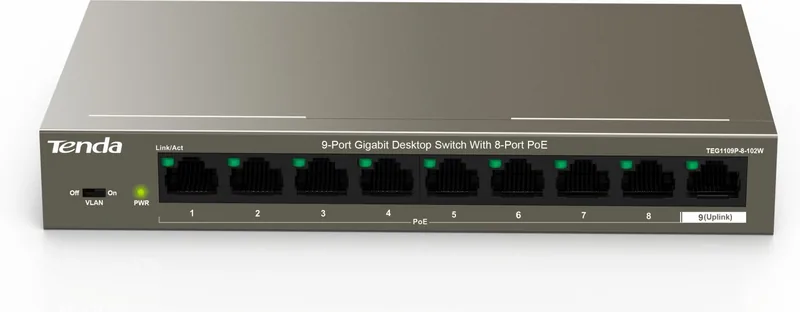
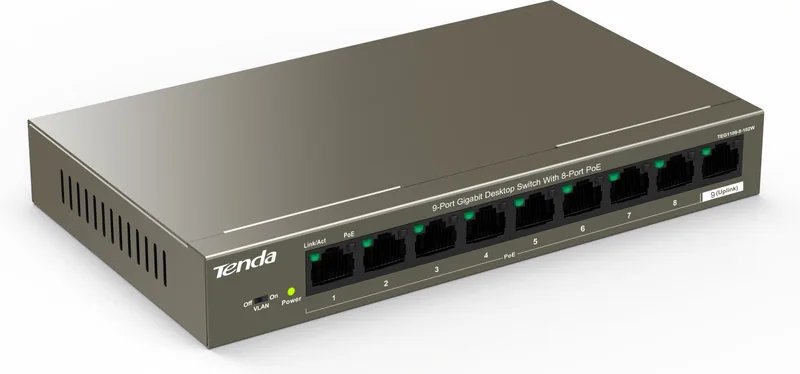
Der Switch ist von der Stromversorgung getrennt oder nicht
Link/Act
(In der linken oberen
Ecke eines jeden Ports)
PoE
(In der rechten oberen
Ecke der Ports 1 – 4 von
TEG1105P-4-63W)
Leuchtet
Dieser Port ist mit einem PoE fähiges Gerät verbunden und
Aus
Dieser Port ist mit keinem PoE fähiges Gerät verbunden oder
startet nicht korrekt.
Einführung in die Betriebsmodi
Der PoE-Switch hat zwei Modi: Default/VLAN Off und VLAN/VLAN On. Schalten Sie den
PoE-Switch über den Schieberegler in den gewünschten Modus. Wählen Sie den Modus
gemäß der nachfolgenden Beschreibungen aus.
Default/VLAN Off: Ist der Standardmodus des PoE-Switches. In diesem Modus
funktioniert der PoE-Switch als unverwalteter PoE-Switch und alle Ports können
untereinander kommunizieren.
VLAN/VLAN On: In diesem Modus können die Ports 1 bis 4 des TEG1105P-4-63W mit
dem Port 5 kommunizieren aber nicht untereinander. Die Ports 1 bis 8 des TEG1109P-8-
102W können dann mit Port 9 kommunizieren aber nicht untereinander. Verwenden Sie
diesen Modus, um Broadcast-Storm zu reduzieren oder den DHCP-Broadcast zu
Deutsch
Indicatore LED
Stato
Descrizione
PWR o Power
Spento
L'interruttore è scollegato dall'alimentazione o non
Link/Act
(Nell'angolo in alto a
sinistra di ogni porta)
Accensione
I dati vengono trasmessi attraverso la porta.
Spento
La porta è scollegata o collegata in modo non corretto.
PoE
(Nell'angolo in alto a
destra delle porte 1 – 4
di TEG1105P-4-63W)
Accensione
La porta è collegata a un dispositivo PoE e viene accesa
Spento
La porta è scollegata da un dispositivo PoE o non viene
Introduzione modalità di lavoro
Lo switch PoE presenta due modalità: Default/VLAN Off, e VLAN/VLAN On. Utilizzare
l'interruttore scorrevole per regolare l'interruttore PoE nella modalità richiesta secondo
le seguenti indicazioni.
Default/VLAN Off:Modalità predefinita dell'interruttore PoE. In questa modalità,
l'interruttore PoE svolge la funzione di un interruttore PoE non gestito, e tutte le porte
possono comunicare le une con le altre.
VLAN/VLAN On: In questa modalità, le porte 1 – 4 del TEG1105P-4-63W possono
comunicare con la porta 5 ma non tra di loro. Le porte 1 – 8 del TEG1109P-8-102W
possono comunicare con la porta 9 ma non tra di loro. Si può utilizzare questa modalità
per ridurre il broadcast storm e isolare la trasmissione DHCP.
Italiano
Indicador LED
Estado
Descrição
PWR ou Power
Off (Desligado)
O interruptor é desligado da fonte de alimentação ou não
Link/Act
(No canto superior
esquedo de cada porta)
A piscar
Os dados estão a ser transmitidos pela porta.
Off (Desligado)
A porta está desconectada ou indevidamente conectada.
PoE
(No canto superior
direito das portas 1 – 4
do TEG1105P-4-63W)
Sólido ativado
A porta está conectada a um dispositivo PoE e a carregar
Off (Desligado)
A porta está desconectada de um dispositivo PoE ou não
Introdução ao Modo de Trabalho
O interruptor PoE tem dois modos: Default/VLAN Off e VLAN/VLAN On. Use o controlo
deslizante para definir o interruptor PoE para o modo necessário de acordo com as
seguintes descrições.
Default/VLAN Off: Modo padrão do interruptor PoE. Neste modo, o interruptor PoE
funciona como um interruptor PoE não gerido e todas as portas podem comunicar
entre si.
VLAN/VLAN On: Neste modo, as portas 1 a 4 do TEG1105P-4-63W podem comunicar
com a porta 5 mas não podem comunicar entre si. As portas 1 a 8 do TEG1109P-8-
102W podem comunicar com a porta 9 mas não podem comunicar entre si. Pode
utilizar este modo para reduzir os distúrbios de transmissão e isolar a transmissão
Português
Indicador LED
Estado
Descripción
PWR o Power
Encendido
El dispositivo está conectado a la fuente de alimentación
Apagado
El switch está desconectado de una fuente de alimentación o no
Link/Act
(en la esquina superior
izquierda de cada
PoE
(en la esquina superior
derecha de los puertos
1 – 4 del
Encendido
El puerto está conectado a un dispositivo PoE y transmite la
alimentación correctamente.
Apagado
El puerto no está conectado a un dispositivo PoE o no transmite
la alimentación correctamente.
Introducción al Modo Trabajo
El switch PoE dispone de dos modos: Default/VLAN Off y VLAN/VLAN On. Use el
interruptor para establecer el switch PoE en el modo deseado de acuerdo con las
descripciones siguientes.
Default/VLAN Off: modo predeterminado del switch PoE. En este modo, el switch PoE
funciona como un switch PoE no administrado y todos los puertos pueden comunicarse
entre sí.
VLAN/VLAN On: En este modo, los puertos 1 a 4 del TEG1105P-4-63W pueden
comunicarse con el puerto 5 pero no pueden comunicarse entre sí. Los puertos 1 a 8
del TEG1109P-8-102W pueden comunicarse con el puerto 9 pero no pueden
comunicarse entre sí. Puede usar este modo para reducir la tormenta de difusión y
Español
Indicateur LED
Statut
Description
PWR ou Power
Eteint
Le commutateur est déconnecté de la source d’alimentation
Link/Act
(En haut à gauche
de chaque port)
PoE
(En haut à droite des
ports 1 à 4 de
TEG1105P-4-63W)
Solide en
Le port est connecté à un périphérique PoE et l'alimente
Eteint
Le port est déconnecté d'un périphérique PoE ou ne
Introduction du mode de fonctionnement
Le commutateur PoE a deux modes: Default/VLAN Off, et VLAN/VLAN On. Utilisez la
glissière pour régler le commutateur PoE au mode requis selon les descriptions
suivantes.
Default/VLAN Off: Mode par défaut du commutateur PoE. Paramétré sur ce mode, le
commutateur PoE fonctionne comme un commutateur PoE non-géré et tous les ports
peuvent communiquer entre eux.
VLAN/VLAN On: Dans ce mode, les ports 1 à 4 de TEG1105P-4-63W peuvent
communiquer avec le port 5 mais pas entre eux. Les ports 1 à 8 de TEG1109P-8-102W
peuvent communiquer avec le port 9 mais pas entre eux. Vous pouvez activer ce mode
Français
LED индикатор
Статус
Описание
PWR или Power
Без прекъсване
Превключвателят е свързан правилно с електрозахранването.
Изключен (Off)
Прекъсвачът е изключен от захранването или не е свързан
правилно с него.
Link/Act
(в горния ляв ъгъл
на всеки порт)
Без прекъсване
Портът е свързан правилно.
Мигащ
Данните се предават през порта.
Изключен (Off)
Портът е прекъснат или неправилно свързан.
PoE
(в горния десен
ъгъл на портове
1 – 4 от
TEG1105P-4-63W)
Без прекъсване
Този порт е свързан към устройство със захранване по
Ethernet (PoE) и се захранва правилно.
Изключен (Off)
Този порт не е свързан към устройство със захранване по
Ethernet (PoE) и не се захранва правилно.
Въведение в работния режим
Превключвателят за захранване по Ethernet (PoE) има два режима:
Default/VLAN Off (По подразбиране/VLAN изключено) и VLAN/VLAN On и
(VLAN/VLAN включено). Използвайте страничния превключвател, за да
настроите превключвателя за захранване по Ethernet (PoE) в изисквания
режим според следните описания.
Default/VLAN Off: Режим по подразбиране на превключвателя за захранван
е по Ethernet (PoE). В този режим превключвателят за захранване по
Ethernet (PoE) функционира като нерегулиран превключвател за захранване
по Ethernet (PoE) и всички портове могат да комуникират един с друг.
VLAN/VLAN On: В този режим портове от 1 до 4 от TEG1105P-4-63W могат
да комуникират с порт 5, но не могат да комуникират един с друг. Портове
от 1 до 8 от TEG1109P-8-102W могат да комуникират с порт 9, но не могат да
комуникират един с друг. Можете да използвате този режим, за да намалите
бродкаст бурята и да изолирате излъчването на DHCP.
Български
LED visszajelző
Státusz
Leírás
PWR vagy Power
Folyamatosan
A készülék helyesen van az energiaellátáshoz csatlakoztatva.
kikapcsolva
A váltó nincs, vagy nem megfelelően van csatlakoztatva a
tápegységhez.
Link/Act
(Az egyes portok bal
felső sarkánál)
Folyamatosan
Az egyező port helyesen van csatlakoztatva.
Villog
Adatátvitel van folyamatban a porton keresztül.
PoE
(A TEG1105P-4-63W
1–4-es portjainak
jobb felső sarkánál)
Folyamatosan
A port PoE eszközhöz van csatlakoztatva, és megfelelő
kikapcsolva
A port nincs csatlakoztatva PoE eszközhöz, vagy nem
Bevezetés: üzemmódok
A PoE kapcsoló két üzemmóddal rendelkezik: Default/VLAN Off
(Alapértelmezett/VLAN kikapcsolva) és VLAN/VLAN On (VLAN/VLAN bekapcsolva). A
csúszókapcsolóval állítsa a PoE kapcsolót a kívánt üzemmódba az alábbi leírások
szerint.
Default/VLAN Off: A PoE kapcsoló alapértelmezett üzemmódja. Ebben az
üzemmódban felügyelet nélküli PoE kapcsolóként működik a PoE kapcsoló, és az
összes port képes kommunikálni egymással.
VLAN/VLAN On: Ebben az üzemmódban a TEG1105P-4-63W 1–4-es portja képes
kommunikálni az 5-ös porttal, de nem képesek kommunikálni egymással. A
TEG1109P-8-102W 1–8-as portja képes kommunikálni a 9-es porttal, de nem képesek
Magyar
Светодиодный
индикатор
Статус
Описание
PWR или Power
Горит постоянно
Коммутатор подключен к источнику питания.
Выключено
Коммутатор отключен от источника питания или
подключен к нему неправильно.
Link/Act
(в левом верхнем
углу каждого
порта)
Горит постоянно
Порт подключен правильно.
Мигает
Через порт осуществляется передача данных.
Выключено
Подключение к порту не выполнено или выполнено
неправильно.
PoE
(в левом правом
углу портов 1 – 4
устройства
TEG1105P-4-63W)
Горит постоянно
Порт подключен к устройству с питанием по технологии
PoE и питание подается правильно.
Выключено
Порт отключен от устройства с питанием по технологии
PoE или питание подается неправильно.
Обзор режимов работы
У коммутатора с PoE есть два режима: Default/VLAN Off и VLAN/VLAN On.
Используйте переключатель для перевода коммутатора с PoE в нужный
режим, выбранный на основе описания.
Default/VLAN Off: Режим по умолчанию коммутатора с PoE. В этом режиме
коммутатор с PoE работает в качестве неуправляемого коммутатора с PoE, и
все порты могут подключаться друг к другу.
VLAN/VLAN On: В этом режиме порты 1 – 4 устройства TEG1105P-4-63W
могут подключаться к порту 5, но не могут подключаться друг к другу.
Порты 1 – 8 устройства TEG1109P-8-102W могут подключаться к порту 9, но
не могут подключаться друг к другу. В этот режим можно перейти, чтобы
уменьшить broadcast шторм и изолировать DHCP broadcast.
Русский
Indicator LED
Stare
Descriere
PWR sau Power
Rămâne aprins
Dispozitivul este conectat corect la sursa de alimentare.
Oprit
Switch-ul este deconectat de la sursa de alimentare sau nu
Link/Act
(în colţul din stânga-
sus al fiecărui port)
Rămâne aprins
Portul corespunzător este conectat corect.
Lumineaza
intermitent
Datele sunt transmise prin port.
Oprit
Portul este deconectat sau nu este conectat corect.
PoE
(în colţul din
dreapta-sus al
porturilor 1 – 4 ale
Rămâne aprins
Portul este conectat la un dispozitiv PoE şi se alimentează
Oprit
Portul este deconectat de la un dispozitiv PoE şi nu se
Prezentarea modurilor de lucru
Switch-ul PoE are două moduri: Default/VLAN Off şi VLAN/VLAN On. Setati switch-ul
PoE în modul dorit din comutator, conform următoarelor descrieri.
Default/VLAN Off: Modul implicit al switch-ului PoE. În acest mod, switch-ul PoE
funcţionează ca un switch PoE fără management şi toate porturile acestuia pot
comunica între ele.
VLAN/VLAN On: În acest mod, porturile 1 – 4 ale TEG1105P-4-63W pot comunica cu
portul 5 dar nu pot comunica între ele. Porturile 1 – 8 ale TEG1109P-8-102W pot
comunica cu portul 9 dar nu pot comunica între ele. Puteți utiliza acest mod pentru a
Română
Kontrolka LED
Stan
Opis
PWR lub Power
Ciągłe światło
Urządzenie jest prawidłowo podłączone do źródła zasilania.
Wyłączone
Urządzenie jest odłączone od źródła zasilania lub nie zostało
do niego poprawnie podłączone.
Link/Act
(w lewym górnym
rogu każdego portu)
Ciągłe światło
Gniazdo jest połączone poprawnie.
Miganie
Port obsługuje przesyłanie danych.
Wyłączone
Port jest odłączony lub niepoprawnie podłączony.
PoE
(w prawym górnym
rogu portów 1 – 4
urządzenia
Ciągłe światło
Port jest podłączony do urządzenia PoE i zasila urządzenie
prawidłowo.
Wyłączone
Port jest odłączony od urządzenia PoE lub nie włącza go
prawidłowo.
Wprowadzenie do trybów pracy
Switch PoE może działać w dwóch trybach: Default/VLAN Off. i VLAN/VLAN On. Za
pomocą przełącznika włącz w switchu PoE wymagany tryb pracy. Opisy trybów znajdują
się poniżej.
Default/VLAN Off: Tryb domyślny switcha PoE. W tym trybie urządzenie działa jako
niezarządzany switch PoE, a wszystkie jego porty komunikują się ze sobą.
VLAN/VLAN On: W tym trybie porty od 1 do 4 urządzenia TEG1105P-4-63W mogą
komunikować się z portem 5, ale nie ze sobą nawzajem. Porty od 1 do 8 urządzenia
TEG1109P-8-102W mogą komunikować się z portem 9, ale nie ze sobą nawzajem.
Polski
TEG1109P-8-102W
VLAN
OffOn
9-Port Gigabit Desktop Switch With 8-Port PoE
PWR
9 (Uplink)
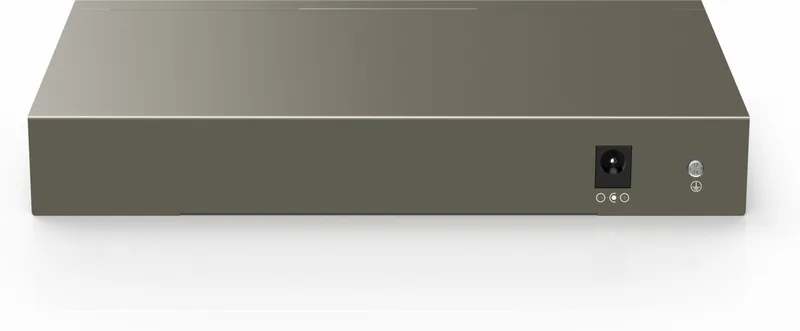
Grounding terminal
/1
%
Vérification rapide
Je ne suis pas un robot
Réponse incorrecte, veuillez réessayer.
Discutez avec votre manuel Tenda TEG1100 grâce à l'IA
Obtenez des réponses instantanées par IA à partir de votre manuel Tenda TEG1100
Posez toutes vos questions concernant le Tenda TEG1100. Les réponses proviennent de ce manuel, avec les pages dont elles sont tirées.
Poser une Question
0/1000
Recommandez-vous TEG1100?
OuiNon
Foire aux
Questions
A
Il fournit neuf ports RJ-45 Gigabit au total : huit ports compatibles PoE pour les appareils alimentes et un port de liaison montante dedie pour un routeur, un enregistreur ou une connexion reseau en amont.
Cette réponse est-elle utile?
A
Le commutateur fournit jusqu'a 30 W depuis un port PoE individuel et dispose d'un budget d'alimentation PoE combine de 92 W. Le nombre reel d'appareils alimentes pris en charge depend de la puissance totale requise par tous les equipements connectes.
Cette réponse est-elle utile?
A
Les ports PoE prennent en charge les appareils IEEE 802.3af et IEEE 802.3at. Les utilisations typiques incluent les cameras IP, les points d'acces sans fil, les telephones IP et autres equipements reseau alimentes compatibles.
Cette réponse est-elle utile?
A
En mode VLAN, les ports 1 a 8 peuvent communiquer avec le port 9, le port de liaison montante, mais ne peuvent pas communiquer directement entre eux. Cela peut reduire le trafic de diffusion et aider a isoler les appareils terminaux.
Cette réponse est-elle utile?
A
Le commutateur utilise des priorites d'alimentation des ports pour eviter les surcharges. Si la demande totale depasse 92 W, il coupe d'abord l'alimentation des ports de priorite inferieure jusqu'a ce que la charge demandee soit comprise dans le budget disponible.
Cette réponse est-elle utile?
A
Oui. Tous les ports prennent en charge Ethernet 10/100/1000 Mbps. Un cablage CAT5e ou CAT6 est recommande pour obtenir des performances Ethernet Gigabit fiables.
Cette réponse est-elle utile?
M: gpt-5.6-terra
Avantageset Inconvénients
Avantages
Huit ports PoE+ IEEE 802.3af/at peuvent alimenter des cameras, des points d'acces, des telephones et d'autres points d'extremite compatibles.
Le budget PoE total de 92 W et jusqu'a 30 W par port prennent en charge des installations flexibles avec plusieurs appareils.
Le port de liaison montante Gigabit dedie separe la connectivite du routeur ou du reseau central des points d'extremite PoE.
Le mode d'isolation VLAN reduit le trafic pair a pair entre les ports PoE et peut limiter les problemes de diffusion.
La protection contre la foudre de 6 kV, la prise en charge de la mise a la terre, les LED d'etat et Auto MDI/MDIX simplifient le deploiement.
VS
Inconvénients
Le budget PoE partage de 92 W peut ne pas alimenter tous les appareils si leur demande combinee depasse la limite.
Le mode VLAN offre une isolation basique des ports plutot que des fonctions avancees de configuration de commutateur gere.
Il est classe comme produit de classe A et peut provoquer des interferences radio dans les environnements residentiels.
La plage de temperature de fonctionnement de 0 a 40 degres C peut ne pas convenir aux emplacements exterieurs extremes.
M: gpt-5.6-terra
Produit
Spécification
Fonction
Commutateur
Type
Autonome
Ports reseau
9 x RJ-45
Vitesses
9 x RJ-45 (10/100/1000Base-T)
PoE
8 x RJ-45 PoE+ (8 x 30 W), total : 92 W
Fond de panier
18 Gbit/s, 13,39 Mpps, 16 K adresses MAC
Normes officiellement prises en charge
802.3, 802.3ab, 802.3af, 802.3at, 802.3u, 802.3x
Configuration
Non gere
Refroidissement
Passif
Dimensions (L x H x P)
17,81 x 2,59 x 10,39 cm
Couleur
Marron
Fonctionnalites speciales
Boitier metallique, alimentation externe, protection contre les surtensions (6 kV)
M: gpt-5.6-terra
Description du Produit
Commutateur Gigabit de bureau Tenda TEG1100, 9x RJ-45, PoE+ 92 W - Lire, telecharger et imprimer gratuitement
Le commutateur Gigabit de bureau Tenda TEG1100, 9x RJ-45, PoE+ 92 W est concu pour les petites entreprises, la surveillance et les deploiements d'extension de reseau necessitant une connectivite Gigabit fiable avec alimentation centralisee par Ethernet. Son format de bureau compact associe huit ports RJ-45 compatibles PoE a un port de liaison montante dedie, ce qui en fait un choix pratique pour connecter des cameras IP, des points d'acces sans fil, des telephones IP et un routeur via un seul appareil pratique.
Reseau Gigabit et alimentation PoE+
Chaque connexion Ethernet prend en charge un fonctionnement a 10/100/1000 Mbps, permettant au commutateur de gerer le trafic local exigeant des appareils reseau modernes. Les huit ports PoE sont conformes aux normes IEEE 802.3af et IEEE 802.3at, fournissant jusqu'a 30 W a un seul appareil compatible. Avec un budget PoE total de 92 W, le commutateur peut alimenter plusieurs points d'extremite tout en reduisant le besoin de prises electriques et d'adaptateurs distincts a chaque point d'installation.
Le neuvieme port dedie fonctionne comme une connexion de liaison montante pour un routeur, un enregistreur video reseau ou un commutateur central. Cette disposition aide a organiser les appareils alimentes tout en offrant un chemin direct vers le reseau etendu. La prise en charge Auto MDI/MDIX accepte les cables Ethernet droits ou croises, simplifiant l'installation et evitant les problemes lies au type de cable.
Isolation simple lorsque necessaire
Un commutateur de mode physique propose deux options de fonctionnement. En mode par defaut, tous les ports peuvent communiquer normalement, ce qui convient aux reseaux de bureau ou de petits sites. Lorsque le mode VLAN est active, les huit ports PoE peuvent communiquer avec le port de liaison montante, mais sont isoles les uns des autres. Cette configuration peut contribuer a limiter le trafic de diffusion et a isoler les diffusions DHCP, ce qui est particulierement utile pour les reseaux de cameras et les autres deploiements axes sur les points d'extremite.
Le commutateur utilise la commutation store-and-forward et offre une capacite de commutation de 18 Gbit/s avec une table d'adresses MAC de 16 K. Des indicateurs clairs PWR, Link/Act et PoE fournissent des informations d'etat immediates sur l'alimentation, la connectivite des cables, l'activite des donnees et la fourniture PoE. Les priorites d'alimentation des ports aident a proteger le systeme lorsque les appareils connectes demandent plus que le budget disponible de 92 W ; les ports de priorite inferieure peuvent perdre l'alimentation en premier en cas de surcharge.
Concu pour des installations pratiques
L'appareil prend en charge une protection contre la foudre de 6 kV et comprend une borne de mise a la terre pour une protection supplementaire lorsqu'il est correctement relie a la terre. Il fonctionne a des temperatures de 0 a 40 degres C et s'integre facilement dans les espaces de travail compacts avec des dimensions de 177,5 x 108 x 26 mm. Pour des performances Gigabit optimales, un cablage CAT5e ou CAT6 est recommande.
Remarques
Connectez la borne de mise a la terre a un cable de terre approprie pour ameliorer la protection contre la foudre.
Planifiez la charge PoE avant de connecter plusieurs appareils de forte puissance.
Le mode VLAN isole les ports PoE les uns des autres tout en maintenant l'acces a la liaison montante.