Manual.ly Logo

SpeaKa Professional SP-MM-900 Mode-D-Emploi

0,0 · 0 Notes

Manuel PDF · 4 Pages

Français

M: QW-35-FL
page

/ 4

Loading...
9570562c1ce6ad72412b9a4a80c88998b845 page 2
2
Safety Instructions
Monitor Arm
Item no: 2731200 (SP-MM-900)
Item no: 2731201 (SP-MM-910)
Item no: 2731202 (SP-MM-920)
Item no: 2731203 (SP-MM-930)
1 Intended use
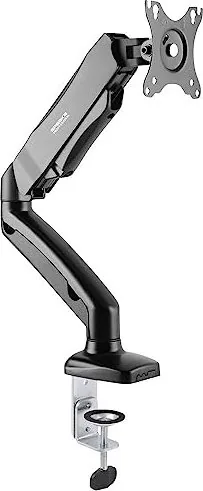
The product is a spring loaded three monitor arm with integrated hub. It secures to your table using a
clamp.
The product is intended for indoor use only. Do not use it outdoors.
Contact with moisture must be avoided under all circumstances.
If you use the product for purposes other than those described, the product may be damaged.
Improper use can result in hazards.
The product complies with the statutory national and European requirements.
For safety and approval purposes, you must not rebuild and/or modify the product.
Read the operating instructions carefully and store them in a safe place. Make this product available to
third parties only together with the operating instructions.
All company names and product names are trademarks of their respective owners. All rights reserved.
2 Delivery contents
■
Product
■
Operating instructions
3 Latest product information
Download the latest product information at www.conrad.com/downloads or scan the QR code shown. Fol-
low the instructions on the website.
4 Description of symbols
The symbol warns of hazards that can lead to personal injury.
5 Safety instructions
Read the operating instructions carefully and especially observe the safety informa-
tion. If you do not follow the safety instructions and information on proper handling,
we assume no liability for any resulting personal injury or damage to property. Such
cases will invalidate the warranty/guarantee.
5.1 General
■
The product is not a toy. Keep it out of the reach of children and pets.
■
Do not leave packaging material lying around carelessly. This may become dangerous playing mater-
ial for children.
■
If you have questions which remain unanswered by this information product, contact our technical
support service or other technical personnel.
■
Maintenance, modifications and repairs must only be completed by a technician or an authorised re-
pair centre.
5.2 Handling
■
Handle the product carefully. Jolts, impacts or a fall even from a low height can damage the product.
5.3 Operating environment
■
Do not place the product under any mechanical stress.
■
Protect the appliance from extreme temperatures, strong jolts, flammable gases, steam and solvents.
■
Protect the product from high humidity and moisture.
■
Protect the product from direct sunlight.
5.4 Operation
■
Consult an expert when in doubt about the operation, safety or connection of the product.
■
If it is no longer possible to operate the product safely, take it out of operation and protect it from any
accidental use. DO NOT attempt to repair the product yourself. Safe operation can no longer be guar-
anteed if the product:
– is visibly damaged,
– is no longer working properly,
– has been stored for extended periods in poor ambient conditions or
– has been subjected to any serious transport-related stresses.
5.5 Connected devices
■
Also observe the safety and operating instructions of any other devices which are connected to the
product.
5.6 Installation location
■
Select an installation location for the monitor holder and any supplied accessories that facilitates safe
and ergonomic use.
5.7 Before assembly and installation
■
Verify that the delivery content is complete before assembling the monitor holder and accessories. Do
not assemble if any parts are missing.
■
Prevent damage to the monitor. Refer to the manufacturer instructions that came with the monitor to
find out how and where to attach a monitor holder or monitor mount.
■
Handle the monitor and screen with care. Always lay the monitor flat and use a pad or cloth to protect
the table surface and monitor from damage.
■
Risk of injury and/or damage when unpacking the spring loaded arm! Hold each spring arm together
while someone else cuts the zip tie. Slowly release the pressure on the spring arms and open slowly
to full length.
5.8 Table mounting
If you mount the monitor holder on a table:
■
Attach the monitor holder only to a sufficiently stable, horizontal table top. Tables made of glass,
ceramic or stone slabs or thin plastic-coated wooden-fibre slabs, are categorically unsuitable for at-
tachments. Furthermore, you must not attach the monitor holder to shelves or similar unstable or un-
steady surfaces.
■
Attach the monitor holder only at a position on the table top that is suitable for this purpose. Consider
the significant lever action involved!
■
The weight of the monitor and monitor holder as well as its fixed position and significant lever action
can all cause pressure marks on the table top. For this reason, we do not recommend that you mount
it on valuable furniture items!
■
For safety reasons, the monitor holder and the monitor that is attached to it should be situated only
above the table surface. The design of many monitor holders means that it is not suitable for the mon-
itor arm to be situated anywhere other than above the table surface. There is also a danger of it top-
pling over in certain circumstances!
■
Ensure that the monitor holder is fixed to the table top securely. Otherwise it could slip off the table
top when you are moving the monitor and the monitor holder. As well as causing material damage,
this poses a danger of personal injury!
5.9 Removing a monitor
■
Risk of injury and/or damage from spring loaded arm! Before removing an attached monitor, always
set the front arm to the highest position so it cannot "spring up" after the monitor is removed.
6 Maintenance
■
Adjusting the positions of the monitor and the monitor mount can cause the screws to become loose
over time. Check all the screw fittings from time to time.
7 Cleaning and care
Important:
– Do not use aggressive cleaning agents, rubbing alcohol or other chemical solutions. They damage
the housing and can cause the product to malfunction.
– Do not immerse the product in water.
1. Disconnect the product from the power supply.
2. Clean the product with a dry, fibre-free cloth.
8 Technical data
8.1 Base
Item No.:
2731200 2731201 2731202
Model No.: SP-MM-900 SP-MM-910 SP-MM-920
Grommet* 10 – 85 mm 10 – 83 mm 10 – 85 mm
C-Clamp* 10 – 85 mm 10 – 83 mm 10 – 80 mm
*These values indicate the min./max. table thickness the grommet and c-clamp can fit.
8.2 Monitor arm
Item No.:
2731200 2731201 2731202 2731203
Model No.: SP-MM-900 SP-MM-910 SP-MM-920 SP-MM-930
Number of monit-
ors
1 2 1 2
Capacity per
monitor
2 - 9 kg 1 - 9 kg
VESA
compatible
75 x 75, 100 x 100
Monitor size 43.2 – 81.3 cm (17 - 32") 33.02 – 81.3 cm (13 - 32")
8.3 General
Item No.:
2731200 2731201 2731202 2731203
Model No.: SP-MM-900 SP-MM-910 SP-MM-920 SP-MM-930
Dimensions 117 x 468 x 570
mm
942 x 112 x 570
mm
115 x 590 x 665
mm
1100x 125 x 670
mm
Weight* 2.05 kg 3.57 kg 3.1 kg 6.03 kg
This is a publication by Conrad Electronic SE, Klaus-Conrad-Str. 1, D-92240 Hirschau (www.conrad.com).
All rights including translation reserved. Reproduction by any method (e.g. photocopying, microfilming or the capture in
electronic data processing systems) requires prior written approval from the editor. Reprinting, also in part, is prohibited.
This publication reflects the technical status at the time of printing.
Copyright by Conrad Electronic SE.
*2731200, 2731201, 2731202, 2731203_V2_0323_dh_ss_en 18014399307966475-2 I3/O2 en

Discutez avec votre manuel SpeaKa Professional SP-MM-900 grâce à l'IA

Obtenez des réponses instantanées par IA à partir de votre manuel SpeaKa Professional SP-MM-900

Posez toutes vos questions concernant le SpeaKa Professional SP-MM-900. Les réponses proviennent de ce manuel, avec les pages dont elles sont tirées.

SP-MM-900 Programme d'entretien

Périodiquement
Vérifier tous les raccords à vis

Le réglage de la position des moniteurs peut desserrer les vis avec le temps. Vérifiez régulièrement tous les raccords à vis.

Si nécessaire
Nettoyer le produit

Débranchez l'alimentation et nettoyez avec un chiffon sec et sans peluche. N'utilisez pas de nettoyants agressifs et n'immergez pas dans l'eau.

M: qwen/qwen3.8-flash

Poser une Question

0/1000

Recommandez-vous SP-MM-900?

Oui Non

Foire aux Questions

A

Non, ce produit est destiné à un usage intérieur uniquement. L'exposition à l'humidité et aux intempéries peut endommager le mécanisme.

Cette réponse est-elle utile?

A

Utilisez des plateaux de table stables et horizontaux. Évitez le verre, la céramique, la pierre ou le bois avec revêtement plastique fin.

Cette réponse est-elle utile?

A

Utilisez un chiffon sec sans fibres. N'utilisez pas de détergents agressifs ou d'immersion dans l'eau.

Cette réponse est-elle utile?

A

Oui, le manuel SpeaKa Professional SP-MM-900 fait partie du contenu de livraison.

Cette réponse est-elle utile?

A

Non, n'essayez pas de réparer le produit vous-même. Consultez un technicien pour l'entretien.

Cette réponse est-elle utile?

A

Les écrans compatibles VESA 75x75 et 100x100 entre 17 et 32 pouces conviennent.

Cette réponse est-elle utile?

A

Oui, la charge du ressort dépend du poids de l'écran. Consultez le manuel pour les limites.

Cette réponse est-elle utile?

M: QW-35-FL

Avantages et Inconvénients

Avantages

  • Le hub intégré fournit une gestion de câbles transparente et une stabilité
  • La conception à ressort permet un repositionnement sans effort de l'écran
  • La pince robuste s'adapte à diverses épaisseurs de table en toute sécurité
  • La compatibilité VESA fonctionne avec les modèles de montage d'écran standard
  • La conception compacte économise de l'espace précieux du bureau
VS

Inconvénients

  • Usage intérieur uniquement empêche la durabilité extérieure
  • Les écrans lourds peuvent affecter l'équilibre de la tension
  • Nécessite une table stable pour prévenir les risques de basculement
  • Le réglage de la tension du ressort doit être fait prudemment
  • Inadapté aux tables en verre ou en céramique
M: QW-35-FL

Produit Spécification

Type

Bureau

Nombre d'écrans

1

Taille de l'écran

43,18-81,28 cm

Ajustabilité

Inclinaison (-45°, +90°), Rotation (180°), Pivotement (180°), Hauteur réglable

Charge max

9,00 kg

VESA

75x75, 100x100

Fonctionnalités

ressort à gaz, gestion des câbles

Couleur

Noir

Dimensions (LxHxP)

46,81x57,00x11,71 cm

Poids

2,05 kg

M: QW-35-FL

Description du Produit

Surélevez votre espace de travail avec le bras d'écran SpeaKa Professional SP-MM-900

Transformez votre configuration de bureau avec le bras d'écran SpeaKa Professional SP-MM-900. Ce bras à ressort est conçu pour une intégration transparente dans votre flux de travail quotidien. Il dispose d'un hub intégré et se fixe à votre table à l'aide d'une pince robuste. Que vous gériez des ensembles de données complexes ou créiez du contenu visuel, avoir votre écran à la hauteur idéale réduit considérablement la tension au niveau du cou. Ce produit est destiné à un usage intérieur uniquement et est conçu pour résister aux exigences opérationnelles quotidiennes dans un environnement de bureau. Il offre de la flexibilité sans compromettre la stabilité.

Pourquoi choisir ce bras d'écran ?

L'ergonomie est clé pour la productivité et la santé à long terme. Le SpeaKa Professional SP-MM-900 permet un ajustement vertical fluide tout en gardant votre bureau sans encombrement. La compatibilité VESA garantit que vous pouvez monter la plupart des écrans standard en toute sécurité. Vous trouverez des étapes d'installation détaillées dans le manuel SpeaKa Professional SP-MM-900. La lecture de ce guide garantit que vous maximisez la durée de vie de votre équipement et évitez des blessures potentielles lors de la configuration. Une manipulation appropriée empêche les chutes accidentelles et les dommages structurels à la surface de la table. Le mécanisme de fixation s'adapte efficacement à diverses épaisseurs de table.

Consignes de sécurité et d'entretien

La sécurité est primordiale lors de l'utilisation de mécanismes à ressort sur les meubles. Avant de déballer, assurez-vous que les bras sont maintenus ensemble pour empêcher le ressort de se libérer de manière inattendue et de causer des blessures. Attachez toujours l'unité à un plateau de table stable et horizontal. Évitez les surfaces en verre ou en céramique qui pourraient glisser sous la pression ou se briser. Le produit doit être gardé à l'écart de l'humidité et de la lumière directe du soleil pour maintenir la durabilité. L'entretien régulier implique de vérifier les raccords à vis pour assurer la stabilité dans le temps. Le nettoyage nécessite un chiffon sec sans fibres pour protéger la finition. N'utilisez jamais de solutions chimiques ou n'immergez pas l'unité dans l'eau. Débranchez l'alimentation si les appareils connectés l'exigent. Protégez-le des températures extrêmes.

Considérations finales sur l'installation

L'organisation de votre espace visuel améliore la concentration et le confort professionnel. Ce bras supporte les écrans dans des limites de poids spécifiques, assurant un fonctionnement sûr pendant des années. N'oubliez pas de consulter les instructions fournies pour les capacités de poids spécifiques et les motifs VESA. En suivant des protocoles d'installation appropriés, vous maintenez la validité de la garantie et la sécurité de l'utilisateur. Votre poste de travail mérite une mise à niveau professionnelle qui combine style et fonctionnalité pratique pour les bureaux modernes. Investissez dans une solution qui évolue avec vos besoins et vous garde à l'aise tout au long de longues journées de travail. Priorisez la sécurité et profitez de la liberté des angles de vision ajustables pour améliorer votre routine de travail quotidienne efficacement.

Notes importantes

Gardez les matériaux d'emballage loin des enfants et des animaux domestiques car ils peuvent être dangereux. Vérifiez le contenu de la livraison avant de commencer l'assemblage pour vous assurer que tous les composants sont présents. Contactez le support technique pour les questions non résolues concernant l'installation ou l'utilisation. La garantie peut être annulée si des modifications non autorisées sont tentées.

M: QW-35-FL

© Copyright 2026 Manual.ly
